Fieldtrip: OPM oddball analysis with source localization using beamformer
Lead authors: Hadi Zaatiti hadi.zaatiti@nyu.edu, Konstantinos Tsilimparis konstantinos.tsilimparis@outlook.com, Osama Abdullah, osama.abdullah@nyu.edu
This notebook is to be run in MATLAB, while having fieldtrip library installed. It is a pipeline for processing the oddball experiment raw data, run frequency analysis in source space, source localization using Beamformer technique. The oddball code experiment in Psychtoolbox can be found here:
Oddball PsychToolBox code for OPM system
Importing data and preprocessing
The data used in this notebook is hosted on NYU BOX. Permissions are given upon request.
Install the BOX app from here
Set an environment variable with name
MEG_DATAto the path of the Data folder e.g.,C:\Users\user_name\Box\MEG\Dataor
C:\Users\user_name\Box\Data
Each experiment run using the OPM system generates a .fif file. We will work with the .fif generated by the Fieldline OPM file set below, the .fif file contains all sensor measurements during the experiments and trigger channels data.
[2]:
% Set the environment variable to NYU BOX


% Read the environment variable to NYU BOX
MEG_DATA_FOLDER = getenv('MEG_DATA');

% Set path to OPM .fif file of sub-03
DATASET_PATH = [MEG_DATA_FOLDER, 'oddball\sub-03\meg-opm\sub-03_ses-2024-05-24_meg_raw.fif'];

% Set path to computed .mat variables, these has been obtained by executing this pipeline and
% will allow you to skip steps if you wish to execute a particular cell
LOAD_PATH = [MEG_DATA_FOLDER, 'oddball\derivatives\opm_oddball_pipeline\sub-03\'];

% Experiment your own test and save your variables in a folder of your choice, choose the folder where to save your variables
% We will also use it to copy variables from LOAD_PATH and use them in the notebook if needed
SAVE_PATH = 'docs\source\5-pipeline\notebooks\fieldtrip\fieldtrip_oddball_opm_data';

try
    cd(SAVE_PATH)
catch
end

% Copy all pre-computed variables to your SAVE_PATH, skip this if you want to run the entire notebook yourself
copyfile(LOAD_PATH, pwd)
If you are testing this notebook and want to execute a specific cell, the required variables necessary to execute the cell will be loaded from the latter directory. If you are doing your own experiment and want to load your own data, then set the Saving folder to any folder of your choice where you would like to save the .mat variables. If you would like to execute a specific cell in this notebook and do not want to run the whole notebook, simply execute the cell, it will load the pre-computed
variables from LOAD_PATH.
Then, we import the raw data and display the header information. The .fif file imported here is the one generated from the OPM system.
[2]:
%% Data initialisation

% Tutorial reference: https://www.fieldtriptoolbox.org/tutorial/eventrelatedaveraging/

cfg                         = [];
cfg.dataset = DATASET_PATH;

data_all = ft_preprocessing(cfg);

% Read the header
hdr = ft_read_header(cfg.dataset);

% Display the header information
disp(hdr);


% The electrode positions for opm can be found in fieldtripdir/template/grad/fieldlinebeta2.mat
% Remind that the positions of the OPM sensor can vary changed on the radial axis of the brain (By pushing OPM sensors in or out)
% So, the sensor layout is changed for every participant according to the axial position of the sensors
% The specific positions of the OPM sensors that are fit to the subjet's head is found in data_all.grad
-------------------------------------------------------------------------------------------
FieldTrip is developed by members and collaborators of the Donders Institute for Brain,
Cognition and Behaviour at Radboud University, Nijmegen, the Netherlands.

                          --------------------------
                        /                            \
                     ------------------------------------
                    /                                    \
          -------------------------------------------------
         /                            /\/\/\/\/\
         ---------------------------------------------------
                  |        F  i  e  l  d  T  r  i  p       |
                  ------------------------------------------
                   \                                      /
                     ------------------------------------
                          \            /
                            ----------

Please cite the FieldTrip reference paper when you have used FieldTrip in your study.
Robert Oostenveld, Pascal Fries, Eric Maris, and Jan-Mathijs Schoffelen. FieldTrip: Open
Source Software for Advanced Analysis of MEG, EEG, and Invasive Electrophysiological Data.
Computational Intelligence and Neuroscience, vol. 2011, Article ID 156869, 9 pages, 2011.
doi:10.1155/2011/156869.
-------------------------------------------------------------------------------------------
Warning: adding C:\Users\hz3752\Documents\fieldtrip\external\mne toolbox to your MATLAB path
==============================================================================

Copyright (c) 2011, Matti Hamalainen and Alexandre Gramfort
All rights reserved.

Redistribution and use in source and binary forms, with or without
modification, are permitted provided that the following conditions are met:
    * Redistributions of source code must retain the above copyright
      notice, this list of conditions and the following disclaimer.
    * Redistributions in binary form must reproduce the above copyright
      notice, this list of conditions and the following disclaimer in the
      documentation and/or other materials provided with the distribution.
    * Neither the name of the Massachusetts General Hospital nor the
      names of its contributors may be used to endorse or promote products
      derived from this software without specific prior written permission.

THIS SOFTWARE IS PROVIDED BY THE COPYRIGHT HOLDERS AND CONTRIBUTORS "AS IS" AND
ANY EXPRESS OR IMPLIED WARRANTIES, INCLUDING, BUT NOT LIMITED TO, THE IMPLIED
WARRANTIES OF MERCHANTABILITY AND FITNESS FOR A PARTICULAR PURPOSE ARE
DISCLAIMED. IN NO EVENT SHALL MASSACHUSETTS GENERAL HOSPITAL BE LIABLE FOR ANY
DIRECT, INDIRECT, INCIDENTAL, SPECIAL, EXEMPLARY, OR CONSEQUENTIAL DAMAGES
(INCLUDING, BUT NOT LIMITED TO, PROCUREMENT OF SUBSTITUTE GOODS OR SERVICES;
LOSS OF USE, DATA, OR PROFITS; OR BUSINESS INTERRUPTION) HOWEVER CAUSED AND
ON ANY THEORY OF LIABILITY, WHETHER IN CONTRACT, STRICT LIABILITY, OR TORT
(INCLUDING NEGLIGENCE OR OTHERWISE) ARISING IN ANY WAY OUT OF THE USE OF THIS
SOFTWARE, EVEN IF ADVISED OF THE POSSIBILITY OF SUCH DAMAGE.
==============================================================================
Warning: FieldLine data requires a numeric value for coilaccuracy>=0
 In 'C:\Users\hz3752\Documents\fieldtrip\fileio\ft_read_header.m' at line 1930
 In 'C:\Users\hz3752\Documents\fieldtrip\ft_preprocessing.m' at line 392
Warning: No device to head transform available in fif file
 In 'C:\Users\hz3752\Documents\fieldtrip\fileio\private\mne2grad.m' at line 100
 In 'C:\Users\hz3752\Documents\fieldtrip\fileio\ft_read_header.m' at line 1941
 In 'C:\Users\hz3752\Documents\fieldtrip\ft_preprocessing.m' at line 392
Warning: MEG channels will likely have coordinates in device frame, not head frame
 In 'C:\Users\hz3752\Documents\fieldtrip\fileio\private\mne2grad.m' at line 101
 In 'C:\Users\hz3752\Documents\fieldtrip\fileio\ft_read_header.m' at line 1941
 In 'C:\Users\hz3752\Documents\fieldtrip\ft_preprocessing.m' at line 392
Warning: There does not seem to be a suitable trigger channel.
 In 'C:\Users\hz3752\Documents\fieldtrip\fileio\private\mne2grad.m' at line 214
 In 'C:\Users\hz3752\Documents\fieldtrip\fileio\ft_read_header.m' at line 1941
 In 'C:\Users\hz3752\Documents\fieldtrip\ft_preprocessing.m' at line 392

Opening raw data file C:\Users\hz3752\Box\MEG\Data\oddball\sub-03\meg-opm\sub-03_ses-2024-05-24_meg_raw.fif...
        Range : 0 ... 1368099  =      0.000 ...   273.620 secs
Ready.
Warning: There does not seem to be a suitable trigger channel.
 In 'C:\Users\hz3752\Documents\fieldtrip\fileio\ft_chantype.m' at line 198
 In 'C:\Users\hz3752\Documents\fieldtrip\fileio\ft_read_header.m' at line 2837
 In 'C:\Users\hz3752\Documents\fieldtrip\ft_preprocessing.m' at line 392

processing channel { 'L202_bz' 'L302_bz' 'R102_bz' 'L404_bz' 'R103_bz' 'L505_bz' 'L203_bz' 'L606_bz' 'L101_bz' 'L208_bz' 'L204_bz' 'L303_bz' 'R107_bz' 'L405_bz' 'L103_bz' 'L502_bz' 'R104_bz' 'L307_bz' 'R105_bz' 'L403_bz' 'L102_bz' 'L402_bz' 'L104_bz' 'L604_bz' 'R101_bz' 'L304_bz' 'L201_bz' 'L306_bz' 'L205_bz' 'L305_bz' 'di31' 'L105_bz' 'L503_bz' 'R307_bz' 'R205_bz' 'L214_bz' 'R301_bz' 'L111_bz' 'R202_bz' 'L113_bz' 'R402_bz' 'R211_bz' 'R203_bz' 'R408_bz' 'R302_bz' 'R213_bz' 'R206_bz' 'R113_bz' 'R304_bz' 'R210_bz' 'R208_bz' 'R209_bz' 'R204_bz' 'R212_bz' 'R305_bz' 'R409_bz' 'R303_bz' 'R308_bz' 'R207_bz' 'R309_bz' 'R201_bz' 'R407_bz' 'R306_bz' 'R311_bz' 'R401_bz' 'R502_bz' 'R504_bz' 'R605_bz' 'R603_bz' 'R503_bz' 'R405_bz' 'R506_bz' 'R507_bz' 'R403_bz' 'R604_bz' 'R111_bz' 'R606_bz' 'L312_bz' 'R406_bz' 'R505_bz' 'R602_bz' 'L407_bz' 'L310_bz' 'L115_bz' 'L211_bz' 'L210_bz' 'L309_bz' 'R110_bz' 'L311_bz' 'L308_bz' 'L406_bz' 'L212_bz' 'R115_bz' 'L209_bz' 'L408_bz' 'L109_bz' 'L409_bz' 'hpiin175' 'hpiout175' 'hpiin176' 'hpiout176' 'hpiin177' 'hpiout177' 'hpiin178' 'hpiout178' 'hpiin179' 'hpiout179' 'hpiin180' 'hpiout180' }
reading and preprocessing
Reading 0 ... 1368099  =      0.000 ...   273.620 secs... [done]
reading and preprocessing trial 1 from 1
the call to "ft_preprocessing" took 24 seconds
Warning: FieldLine data requires a numeric value for coilaccuracy>=0
In 'C:\Users\hz3752\Documents\fieldtrip\fileio\ft_read_header.m' at line 1930
Warning: No device to head transform available in fif file
 In 'C:\Users\hz3752\Documents\fieldtrip\fileio\private\mne2grad.m' at line 100
 In 'C:\Users\hz3752\Documents\fieldtrip\fileio\ft_read_header.m' at line 1941
Warning: MEG channels will likely have coordinates in device frame, not head frame
 In 'C:\Users\hz3752\Documents\fieldtrip\fileio\private\mne2grad.m' at line 101
 In 'C:\Users\hz3752\Documents\fieldtrip\fileio\ft_read_header.m' at line 1941
Warning: There does not seem to be a suitable trigger channel.
 In 'C:\Users\hz3752\Documents\fieldtrip\fileio\private\mne2grad.m' at line 214
 In 'C:\Users\hz3752\Documents\fieldtrip\fileio\ft_read_header.m' at line 1941

Opening raw data file C:\Users\hz3752\Box\MEG\Data\oddball\sub-03\meg-opm\sub-03_ses-2024-05-24_meg_raw.fif...
        Range : 0 ... 1368099  =      0.000 ...   273.620 secs
Ready.
Warning: There does not seem to be a suitable trigger channel.
 In 'C:\Users\hz3752\Documents\fieldtrip\fileio\ft_chantype.m' at line 198
 In 'C:\Users\hz3752\Documents\fieldtrip\fileio\ft_read_header.m' at line 2837

          label: {109x1 cell}
         nChans: 109
             Fs: 5000
           grad: [1x1 struct]
       nSamples: 1368100
    nSamplesPre: 0
        nTrials: 1
           orig: [1x1 struct]
       chantype: {109x1 cell}
       chanunit: {109x1 cell}
Defining trials
Remind that in oddball task we had three kind of stimulus:
a 500 Hz a high frequency noise
a white noise
a low frequency 200Hz noise
We will read the triggers from the data and plot them. Channel di31 is the digital stimulus channel on the OPM, it can take any values 0 to 256. The current NYUAD lab setup is limited in number of digital pins to 27 and doesn’t use the full 36 of the OPM. The PsychToolBox odddball experiment has been coded so that the triggers for the:
the 200Hz Low Frequency (LF) tone has a value of 1 on
di31channelthe White Noise (WN) has a value of 2 on
di31channelthe 500Hz High Frequency (HF) tone has a value of 3 on the
di31channel
The following plot is then obtained showing the triggers with respect to time in a GUI that can be zoomed in and out.
[7]:
%% Plot the trigger channel

cfg = [];
cfg.dataset = DATASET_PATH;
cfg.channel = 'di31';
data=ft_preprocessing(cfg);
figure;plot(data.time{1},data.trial{1});
Warning: FieldLine data requires a numeric value for coilaccuracy>=0
 In 'C:\Users\hz3752\Documents\fieldtrip\fileio\ft_read_header.m' at line 1930
 In 'C:\Users\hz3752\Documents\fieldtrip\ft_preprocessing.m' at line 392
Warning: No device to head transform available in fif file
 In 'C:\Users\hz3752\Documents\fieldtrip\fileio\private\mne2grad.m' at line 100
 In 'C:\Users\hz3752\Documents\fieldtrip\fileio\ft_read_header.m' at line 1941
 In 'C:\Users\hz3752\Documents\fieldtrip\ft_preprocessing.m' at line 392
Warning: MEG channels will likely have coordinates in device frame, not head frame
 In 'C:\Users\hz3752\Documents\fieldtrip\fileio\private\mne2grad.m' at line 101
 In 'C:\Users\hz3752\Documents\fieldtrip\fileio\ft_read_header.m' at line 1941
 In 'C:\Users\hz3752\Documents\fieldtrip\ft_preprocessing.m' at line 392
Warning: There does not seem to be a suitable trigger channel.
 In 'C:\Users\hz3752\Documents\fieldtrip\fileio\private\mne2grad.m' at line 214
 In 'C:\Users\hz3752\Documents\fieldtrip\fileio\ft_read_header.m' at line 1941
 In 'C:\Users\hz3752\Documents\fieldtrip\ft_preprocessing.m' at line 392

Opening raw data file C:\Users\hz3752\Box\MEG\Data\oddball\sub-03\meg-opm\sub-03_ses-2024-05-24_meg_raw.fif...
        Range : 0 ... 1368099  =      0.000 ...   273.620 secs
Ready.
processing channel { 'di31' }
reading and preprocessing
Reading 0 ... 1368099  =      0.000 ...   273.620 secs... [done]
reading and preprocessing trial 1 from 1
the call to "ft_preprocessing" took 5 seconds
[7]:
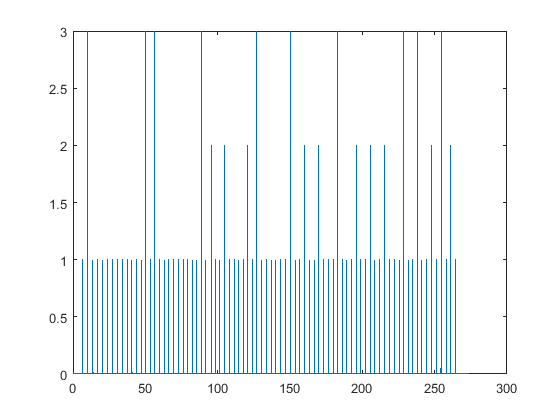
We will now define the trials, each trial is a set of the time series of the sensors data limited to a time segment of length [prestim,poststim] where the 0 time value on that segment corresponds exactly to a trigger event. For the oddball task we would usually want to identify a strong p100 and a less intense p300. So we will make sure we take a poststim higher than 300ms.
The reaction of the brain we are interested in analysing lays within the time interval POST = [0, poststim]. The sensor data of the latter, can be corrected against a baseline to increase the SNR. The baselinewindow = [-x, 0] is a time interval where x>0, picked exactly prior to the stimulus. For the baseline correction operation, a demean is applied, this operation does the following for each trial:
computes the mean value of the data at the baseline window time defined in
baselinewindowsubstracts from the data at the POST interval
A detrend is applied when a low frequency noise is carrying the signal upwards or downwards linearly with time. The lpfilter is commented but could be used if needed. Remind that any noise filter removes a part of the data, avoid using noise filters unless justified (e.g., eyeblink removal, EKG,…). We recommend to perform your analysis fully then add necessary noise filters and see the effect they have on the analysis.
[11]:
%% Defining Trials

%value = 1 is the 500 Hz audio
%value = 2 is the white noise
%value = 3 is the 200 Hz audio

cfg = [];
cfg.dataset                 = DATASET_PATH;
cfg.trialfun = 'ft_trialfun_general';                 % this is the default trial type
cfg.trialdef.eventtype = 'di31';                      % Specify the trigger channel
cfg.trialdef.eventvalue = [1, 2, 3];                  % Define the value of the trigger
cfg.channel = {'L*', 'R*'};                           % Choose the OPM channels (that starts with L or R followed by an expression, * is a wildcharacter)
cfg.preproc.demean     = 'yes';
cfg.preproc.detrend = 'yes';
cfg.preproc.baselinewindow = [-0.2 0];
%cfg.lpfilter   = 'yes';                              % apply lowpass filter
%cfg.lpfreq     = 35;                                 % lowpass at 35 Hz.
cfg.trialdef.prestim        = 0.5; % in seconds
cfg.trialdef.poststim       = 1.2; % in seconds

cfg = ft_definetrial(cfg);

data = ft_preprocessing(cfg);
evaluating trial function 'ft_trialfun_general'
reading the header from 'C:\Users\hz3752\Box\MEG\Data\oddball\sub-03\meg-opm\sub-03_ses-2024-05-24_meg_raw.fif'
Warning: FieldLine data requires a numeric value for coilaccuracy>=0
 In 'C:\Users\hz3752\Documents\fieldtrip\fileio\ft_read_header.m' at line 1930
 In 'C:\Users\hz3752\Documents\fieldtrip\trialfun\ft_trialfun_general.m' at line 108
 In 'C:\Users\hz3752\Documents\fieldtrip\ft_definetrial.m' at line 198
Warning: No device to head transform available in fif file
 In 'C:\Users\hz3752\Documents\fieldtrip\fileio\private\mne2grad.m' at line 100
 In 'C:\Users\hz3752\Documents\fieldtrip\fileio\ft_read_header.m' at line 1941
 In 'C:\Users\hz3752\Documents\fieldtrip\trialfun\ft_trialfun_general.m' at line 108
 In 'C:\Users\hz3752\Documents\fieldtrip\ft_definetrial.m' at line 198
Warning: MEG channels will likely have coordinates in device frame, not head frame
 In 'C:\Users\hz3752\Documents\fieldtrip\fileio\private\mne2grad.m' at line 101
 In 'C:\Users\hz3752\Documents\fieldtrip\fileio\ft_read_header.m' at line 1941
 In 'C:\Users\hz3752\Documents\fieldtrip\trialfun\ft_trialfun_general.m' at line 108
 In 'C:\Users\hz3752\Documents\fieldtrip\ft_definetrial.m' at line 198
Warning: There does not seem to be a suitable trigger channel.
 In 'C:\Users\hz3752\Documents\fieldtrip\fileio\private\mne2grad.m' at line 214
 In 'C:\Users\hz3752\Documents\fieldtrip\fileio\ft_read_header.m' at line 1941
 In 'C:\Users\hz3752\Documents\fieldtrip\trialfun\ft_trialfun_general.m' at line 108
 In 'C:\Users\hz3752\Documents\fieldtrip\ft_definetrial.m' at line 198

Opening raw data file C:\Users\hz3752\Box\MEG\Data\oddball\sub-03\meg-opm\sub-03_ses-2024-05-24_meg_raw.fif...
        Range : 0 ... 1368099  =      0.000 ...   273.620 secs
Ready.
Warning: There does not seem to be a suitable trigger channel.
 In 'C:\Users\hz3752\Documents\fieldtrip\fileio\ft_chantype.m' at line 198
 In 'C:\Users\hz3752\Documents\fieldtrip\fileio\ft_read_header.m' at line 2837
 In 'C:\Users\hz3752\Documents\fieldtrip\trialfun\ft_trialfun_general.m' at line 108
 In 'C:\Users\hz3752\Documents\fieldtrip\ft_definetrial.m' at line 198

reading the events from 'C:\Users\hz3752\Box\MEG\Data\oddball\sub-03\meg-opm\sub-03_ses-2024-05-24_meg_raw.fif'
Warning: FieldLine data requires a numeric value for coilaccuracy>=0
 In 'C:\Users\hz3752\Documents\fieldtrip\fileio\ft_read_header.m' at line 1930
 In 'C:\Users\hz3752\Documents\fieldtrip\fileio\ft_read_event.m' at line 1685
 In 'C:\Users\hz3752\Documents\fieldtrip\trialfun\ft_trialfun_general.m' at line 117
 In 'C:\Users\hz3752\Documents\fieldtrip\ft_definetrial.m' at line 198
Warning: No device to head transform available in fif file
 In 'C:\Users\hz3752\Documents\fieldtrip\fileio\private\mne2grad.m' at line 100
 In 'C:\Users\hz3752\Documents\fieldtrip\fileio\ft_read_header.m' at line 1941
 In 'C:\Users\hz3752\Documents\fieldtrip\fileio\ft_read_event.m' at line 1685
 In 'C:\Users\hz3752\Documents\fieldtrip\trialfun\ft_trialfun_general.m' at line 117
 In 'C:\Users\hz3752\Documents\fieldtrip\ft_definetrial.m' at line 198
Warning: MEG channels will likely have coordinates in device frame, not head frame
 In 'C:\Users\hz3752\Documents\fieldtrip\fileio\private\mne2grad.m' at line 101
 In 'C:\Users\hz3752\Documents\fieldtrip\fileio\ft_read_header.m' at line 1941
 In 'C:\Users\hz3752\Documents\fieldtrip\fileio\ft_read_event.m' at line 1685
 In 'C:\Users\hz3752\Documents\fieldtrip\trialfun\ft_trialfun_general.m' at line 117
 In 'C:\Users\hz3752\Documents\fieldtrip\ft_definetrial.m' at line 198
Warning: There does not seem to be a suitable trigger channel.
 In 'C:\Users\hz3752\Documents\fieldtrip\fileio\private\mne2grad.m' at line 214
 In 'C:\Users\hz3752\Documents\fieldtrip\fileio\ft_read_header.m' at line 1941
 In 'C:\Users\hz3752\Documents\fieldtrip\fileio\ft_read_event.m' at line 1685
 In 'C:\Users\hz3752\Documents\fieldtrip\trialfun\ft_trialfun_general.m' at line 117
 In 'C:\Users\hz3752\Documents\fieldtrip\ft_definetrial.m' at line 198

Opening raw data file C:\Users\hz3752\Box\MEG\Data\oddball\sub-03\meg-opm\sub-03_ses-2024-05-24_meg_raw.fif...
        Range : 0 ... 1368099  =      0.000 ...   273.620 secs
Ready.
Reading 0 ... 1368099  =      0.000 ...   273.620 secs... [done]
found 80 events
created 80 trials
the call to "ft_definetrial" took 5 seconds
Warning: FieldLine data requires a numeric value for coilaccuracy>=0
 In 'C:\Users\hz3752\Documents\fieldtrip\fileio\ft_read_header.m' at line 1930
 In 'C:\Users\hz3752\Documents\fieldtrip\ft_preprocessing.m' at line 392
Warning: No device to head transform available in fif file
 In 'C:\Users\hz3752\Documents\fieldtrip\fileio\private\mne2grad.m' at line 100
 In 'C:\Users\hz3752\Documents\fieldtrip\fileio\ft_read_header.m' at line 1941
 In 'C:\Users\hz3752\Documents\fieldtrip\ft_preprocessing.m' at line 392
Warning: MEG channels will likely have coordinates in device frame, not head frame
 In 'C:\Users\hz3752\Documents\fieldtrip\fileio\private\mne2grad.m' at line 101
 In 'C:\Users\hz3752\Documents\fieldtrip\fileio\ft_read_header.m' at line 1941
 In 'C:\Users\hz3752\Documents\fieldtrip\ft_preprocessing.m' at line 392
Warning: There does not seem to be a suitable trigger channel.
 In 'C:\Users\hz3752\Documents\fieldtrip\fileio\private\mne2grad.m' at line 214
 In 'C:\Users\hz3752\Documents\fieldtrip\fileio\ft_read_header.m' at line 1941
 In 'C:\Users\hz3752\Documents\fieldtrip\ft_preprocessing.m' at line 392

Opening raw data file C:\Users\hz3752\Box\MEG\Data\oddball\sub-03\meg-opm\sub-03_ses-2024-05-24_meg_raw.fif...
        Range : 0 ... 1368099  =      0.000 ...   273.620 secs
Ready.
Warning: There does not seem to be a suitable trigger channel.
 In 'C:\Users\hz3752\Documents\fieldtrip\fileio\ft_chantype.m' at line 198
 In 'C:\Users\hz3752\Documents\fieldtrip\fileio\ft_read_header.m' at line 2837
 In 'C:\Users\hz3752\Documents\fieldtrip\ft_preprocessing.m' at line 392

processing channel { 'L202_bz' 'L302_bz' 'R102_bz' 'L404_bz' 'R103_bz' 'L505_bz' 'L203_bz' 'L606_bz' 'L101_bz' 'L208_bz' 'L204_bz' 'L303_bz' 'R107_bz' 'L405_bz' 'L103_bz' 'L502_bz' 'R104_bz' 'L307_bz' 'R105_bz' 'L403_bz' 'L102_bz' 'L402_bz' 'L104_bz' 'L604_bz' 'R101_bz' 'L304_bz' 'L201_bz' 'L306_bz' 'L205_bz' 'L305_bz' 'L105_bz' 'L503_bz' 'R307_bz' 'R205_bz' 'L214_bz' 'R301_bz' 'L111_bz' 'R202_bz' 'L113_bz' 'R402_bz' 'R211_bz' 'R203_bz' 'R408_bz' 'R302_bz' 'R213_bz' 'R206_bz' 'R113_bz' 'R304_bz' 'R210_bz' 'R208_bz' 'R209_bz' 'R204_bz' 'R212_bz' 'R305_bz' 'R409_bz' 'R303_bz' 'R308_bz' 'R207_bz' 'R309_bz' 'R201_bz' 'R407_bz' 'R306_bz' 'R311_bz' 'R401_bz' 'R502_bz' 'R504_bz' 'R605_bz' 'R603_bz' 'R503_bz' 'R405_bz' 'R506_bz' 'R507_bz' 'R403_bz' 'R604_bz' 'R111_bz' 'R606_bz' 'L312_bz' 'R406_bz' 'R505_bz' 'R602_bz' 'L407_bz' 'L310_bz' 'L115_bz' 'L211_bz' 'L210_bz' 'L309_bz' 'R110_bz' 'L311_bz' 'L308_bz' 'L406_bz' 'L212_bz' 'R115_bz' 'L209_bz' 'L408_bz' 'L109_bz' 'L409_bz' }
reading and preprocessing
Reading 30816 ... 39315  =      6.163 ...     7.863 secs... [done]
Reading 48418 ... 56917  =      9.684 ...    11.383 secs... [done]
reading and preprocessing trial 3 from 80Reading 66066 ... 74565  =     13.213 ...    14.913 secs... [done]
Reading 82163 ... 90662  =     16.433 ...    18.132 secs... [done]
reading and preprocessing trial 5 from 80Reading 98257 ... 106756  =     19.651 ...    21.351 secs... [done]
Reading 115874 ... 124373  =     23.175 ...    24.875 secs... [done]
reading and preprocessing trial 7 from 80Reading 133464 ... 141963  =     26.693 ...    28.393 secs... [done]
Reading 151071 ... 159570  =     30.214 ...    31.914 secs... [done]
reading and preprocessing trial 9 from 80Reading 168652 ... 177151  =     33.730 ...    35.430 secs... [done]
Reading 185259 ... 193758  =     37.052 ...    38.752 secs... [done]
reading and preprocessing trial 11 from 80Reading 200871 ... 209370  =     40.174 ...    41.874 secs... [done]
Reading 217465 ... 225964  =     43.493 ...    45.193 secs... [done]
reading and preprocessing trial 13 from 80Reading 232564 ... 241063  =     46.513 ...    48.213 secs... [done]
Reading 248149 ... 256648  =     49.630 ...    51.330 secs... [done]
reading and preprocessing trial 15 from 80Reading 264269 ... 272768  =     52.854 ...    54.554 secs... [done]
Reading 280869 ... 289368  =     56.174 ...    57.874 secs... [done]
reading and preprocessing trial 17 from 80Reading 295949 ... 304448  =     59.190 ...    60.890 secs... [done]
Reading 312065 ... 320564  =     62.413 ...    64.113 secs... [done]
reading and preprocessing trial 19 from 80Reading 327664 ... 336163  =     65.533 ...    67.233 secs... [done]
Reading 345263 ... 353762  =     69.053 ...    70.752 secs... [done]
reading and preprocessing trial 21 from 80Reading 361364 ... 369863  =     72.273 ...    73.973 secs... [done]
Reading 378460 ... 386959  =     75.692 ...    77.392 secs... [done]
reading and preprocessing trial 23 from 80Reading 393554 ... 402053  =     78.711 ...    80.411 secs... [done]
Reading 409153 ... 417652  =     81.831 ...    83.530 secs... [done]
reading and preprocessing trial 25 from 80Reading 425774 ... 434273  =     85.155 ...    86.855 secs... [done]
Reading 440863 ... 449362  =     88.173 ...    89.872 secs... [done]
Reading 456966 ... 465465  =     91.393 ...    93.093 secs... [done]
reading and preprocessing trial 28 from 80Reading 474558 ... 483057  =     94.912 ...    96.611 secs... [done]
Reading 489659 ... 498158  =     97.932 ...    99.632 secs... [done]
reading and preprocessing trial 30 from 80Reading 505279 ... 513778  =    101.056 ...   102.756 secs... [done]
Reading 521407 ... 529906  =    104.281 ...   105.981 secs... [done]
reading and preprocessing trial 32 from 80Reading 538512 ... 547011  =    107.702 ...   109.402 secs... [done]
Reading 555117 ... 563616  =    111.023 ...   112.723 secs... [done]
reading and preprocessing trial 34 from 80Reading 570729 ... 579228  =    114.146 ...   115.846 secs... [done]
Reading 585815 ... 594314  =    117.163 ...   118.863 secs... [done]
Reading 601423 ... 609922  =    120.285 ...   121.984 secs... [done]
reading and preprocessing trial 37 from 80Reading 617515 ... 626014  =    123.503 ...   125.203 secs... [done]
Reading 632623 ... 641122  =    126.525 ...   128.224 secs... [done]
reading and preprocessing trial 39 from 80Reading 650216 ... 658715  =    130.043 ...   131.743 secs... [done]
Reading 665311 ... 673810  =    133.062 ...   134.762 secs... [done]
reading and preprocessing trial 41 from 80Reading 681906 ... 690405  =    136.381 ...   138.081 secs... [done]
Reading 699020 ... 707519  =    139.804 ...   141.504 secs... [done]
reading and preprocessing trial 43 from 80Reading 715129 ... 723628  =    143.026 ...   144.726 secs... [done]
Reading 731724 ... 740223  =    146.345 ...   148.045 secs... [done]
reading and preprocessing trial 45 from 80Reading 748307 ... 756806  =    149.661 ...   151.361 secs... [done]
Reading 764911 ... 773410  =    152.982 ...   154.682 secs... [done]
reading and preprocessing trial 47 from 80Reading 780033 ... 788532  =    156.007 ...   157.706 secs... [done]
Reading 796162 ... 804661  =    159.232 ...   160.932 secs... [done]
reading and preprocessing trial 49 from 80Reading 813272 ... 821771  =    162.654 ...   164.354 secs... [done]
reading and preprocessing trial 50 from 80Reading 830883 ... 839382  =    166.177 ...   167.876 secs... [done]
Reading 846519 ... 855018  =    169.304 ...   171.004 secs... [done]
reading and preprocessing trial 52 from 80Reading 863135 ... 871634  =    172.627 ...   174.327 secs... [done]
Reading 880226 ... 888725  =    176.045 ...   177.745 secs... [done]
reading and preprocessing trial 54 from 80Reading 896828 ... 905327  =    179.366 ...   181.065 secs... [done]
Reading 911926 ... 920425  =    182.385 ...   184.085 secs... [done]
reading and preprocessing trial 56 from 80Reading 928525 ... 937024  =    185.705 ...   187.405 secs... [done]
Reading 944126 ... 952625  =    188.825 ...   190.525 secs... [done]
reading and preprocessing trial 58 from 80Reading 960225 ... 968724  =    192.045 ...   193.745 secs... [done]
Reading 976332 ... 984831  =    195.266 ...   196.966 secs... [done]
Reading 991420 ... 999919  =    198.284 ...   199.984 secs... [done]
reading and preprocessing trial 61 from 80Reading 1008525 ... 1017024  =    201.705 ...   203.405 secs... [done]
Reading 1024129 ... 1032628  =    204.826 ...   206.526 secs... [done]
reading and preprocessing trial 63 from 80Reading 1041234 ... 1049733  =    208.247 ...   209.947 secs... [done]
Reading 1056320 ... 1064819  =    211.264 ...   212.964 secs... [done]
reading and preprocessing trial 65 from 80Reading 1073916 ... 1082415  =    214.783 ...   216.483 secs... [done]
Reading 1091509 ... 1100008  =    218.302 ...   220.002 secs... [done]
reading and preprocessing trial 67 from 80Reading 1108110 ... 1116609  =    221.622 ...   223.322 secs... [done]
Reading 1124711 ... 1133210  =    224.942 ...   226.642 secs... [done]
reading and preprocessing trial 69 from 80Reading 1140323 ... 1148822  =    228.065 ...   229.764 secs... [done]
Reading 1155416 ... 1163915  =    231.083 ...   232.783 secs... [done]
reading and preprocessing trial 71 from 80Reading 1172014 ... 1180513  =    234.403 ...   236.103 secs... [done]
Reading 1187611 ... 1196110  =    237.522 ...   239.222 secs... [done]
reading and preprocessing trial 73 from 80Reading 1203232 ... 1211731  =    240.646 ...   242.346 secs... [done]
Reading 1220322 ... 1228821  =    244.064 ...   245.764 secs... [done]
reading and preprocessing trial 75 from 80Reading 1236929 ... 1245428  =    247.386 ...   249.086 secs... [done]
Reading 1254535 ... 1263034  =    250.907 ...   252.607 secs... [done]
reading and preprocessing trial 77 from 80Reading 1270176 ... 1278675  =    254.035 ...   255.735 secs... [done]
Reading 1287789 ... 1296288  =    257.558 ...   259.258 secs... [done]
reading and preprocessing trial 79 from 80Reading 1303389 ... 1311888  =    260.678 ...   262.378 secs... [done]
Reading 1319020 ... 1327519  =    263.804 ...   265.504 secs... [done]
reading and preprocessing trial 80 from 80
the call to "ft_preprocessing" took 5 seconds
Display the trials and visually inspect them.
[12]:
%% Visualise trials

cfg = ft_databrowser(cfg, data);
the input is raw data with 96 channels and 80 trials
Warning: Original data has trialinfo, using user-specified trialinfo instead
 In 'C:\Users\hz3752\Documents\fieldtrip\ft_redefinetrial.m' at line 268
 In 'C:\Users\hz3752\Documents\fieldtrip\ft_databrowser.m' at line 336

the call to "ft_redefinetrial" took 0 seconds
the input is raw data with 96 channels and 80 trials
detected   0 visual artifacts
the different artifact types correspond to the following colors:
  visual = pink
the different event types correspond to the following colors:
  di31 = black
------------------------------------------------------------------------------------
You can use the following keyboard buttons in the databrowser
1-9                : select artifact type 1-9
shift 1-9          : select previous artifact of type 1-9 (does not work with numpad)
alt 1-9            : select next artifact of type 1-9
arrow-left         : previous trial
arrow-right        : next trial
shift arrow-up     : increase vertical scaling
shift arrow-down   : decrease vertical scaling
shift arrow-left   : increase horizontal scaling
shift arrow-down   : decrease horizontal scaling
t                  : open trial or segment selection dialog
c                  : open channel selection dialog
h                  : open horizontal scaling dialog
v                  : open vertical scaling dialog
p                  : open preproc editor
i                  : identify a specific channel
m                  : toggles between cfg.viewmode options
s                  : toggles between cfg.selectmode options
q                  : quit
------------------------------------------------------------------------------------

the call to "ft_databrowser" took 5 seconds
The following GUI will appear allowing you to select artifacts, pass through trials and make a visual inspection. Use the above keyboard shortcut to properly use the GUI. 
There is three types of trials, we have now to group them separately according to the type of stimulus. This will allow us to constrast trials of one type with trials of another type. For the oddball task we would like to see the brain waves contrast between the WN, HF and the LF.
[13]:
%% Filter trials on specific type (1)

cfg = [];
cfg.trials = data.trialinfo == 1;
dataLF = ft_redefinetrial(cfg, data);

save dataLF dataLF
the input is raw data with 96 channels and 80 trials
selecting 60 trials
the call to "ft_selectdata" took 0 seconds
the call to "ft_redefinetrial" took 0 seconds
[14]:
%% Filter trials on specific type (2)

cfg = [];
cfg.trials = data.trialinfo == 2;
dataWN = ft_redefinetrial(cfg, data);

save dataWN dataWN
the input is raw data with 96 channels and 80 trials
selecting 10 trials
the call to "ft_selectdata" took 0 seconds
the call to "ft_redefinetrial" took 0 seconds
[15]:
%% Filter trials on specific type (3)

cfg = [];
cfg.trials = data.trialinfo == 3;
dataHF = ft_redefinetrial(cfg, data);

save dataHF dataHF
the input is raw data with 96 channels and 80 trials
selecting 10 trials
the call to "ft_selectdata" took 0 seconds
the call to "ft_redefinetrial" took 0 seconds
Some trials and channels might be extremely noisy, a check is made in the following to remove the trials and bad channels. Simply click on bad trials first, then on bad channels. (Never exclude channels first, but always trials)
[5]:
%% Visual Inspection LF


cfg = [];
cfg.method='summary';
cfg.channel = {'L*', 'R*'};

dataLF_rej = ft_rejectvisual(cfg, dataLF);


save dataLF_rej dataLF_rej
the input is raw data with 109 channels and 60 trials
before GUI interaction: 60 trials marked to INCLUDE, 0 trials marked to EXCLUDE
before GUI interaction: 96 channels marked to INCLUDE, 13 channels marked to EXCLUDE
showing a summary of the data for all channels and trials
computing var [--|                                                        computing var [------------------------------/                            computing var [------------------------------------------------------------]
after GUI interaction: 58 trials marked to INCLUDE, 2 trials marked to EXCLUDE
after GUI interaction: 94 channels marked to INCLUDE, 15 channels marked to EXCLUDE
the following channels were removed: di31, R308_bz, L115_bz, hpiin175, hpiout175, hpiin176, hpiout176, hpiin177, hpiout177, hpiin178, hpiout178, hpiin179, hpiout179, hpiin180, hpiout180
the following trials were removed: 10, 34
the call to "ft_selectdata" took 0 seconds
the call to "ft_rejectvisual" took 67 seconds
The following window pops up, choose a metric to discriminate bad trials first then bad channels. Example: for the var metric, we would see certain trials having a very different variance than the majority of the trials (bottom left window). Click that trial to eliminate it. Once done, do the same with clicking on the top right window to eliminate bad channels.

We will now do the same with the HF and WN trials.
[ ]:
%% Visual Inspection HF

cfg = [];
cfg.method='summary'; % Start first with eliminating trials rather than channels
cfg.channel = {'L*', 'R*'};

dataHF_rej = ft_rejectvisual(cfg, dataHF);

save dataHF_rej dataHF_rej
[ ]:
%% Visual Inspection WN


cfg = [];
cfg.method='summary';
cfg.channel = {'L*', 'R*'};

dataWN_rej = ft_rejectvisual(cfg, dataWN);

save dataWN_rej dataWN_rej
Time-lock analysis
It is known that in an auditory task, we should see the auditory cortex activated 100ms after the audio stimulus (p100) has been presented and perhaps a p300 at 300ms. However, the latter is radial and is better captured by EEG than by MEG. In the sequel, we will focus on showing this result. Start by first computing the averaged Event-Related Fields (ERF) over the trials for each trial type. The ERF are fluctuations in the magnetic field generated by the brain occuring in response to the stimuli. This step takes a few minutes to complete.
[38]:
load dataLF_rej dataLF_rej
load dataHF_rej dataHF_rej
load dataWN_rej dataWN_rej

cfg = [];

avgLF = ft_timelockanalysis(cfg, dataLF_rej);
avgHF = ft_timelockanalysis(cfg, dataHF_rej);
avgWN = ft_timelockanalysis(cfg, dataWN_rej);

% Optional: Save if you are experimenting different configurations
%save avgLF avgLF
%save avgHF avgHF
%save avgWN avgWN
the input is raw data with 94 channels and 52 trials
the call to "ft_selectdata" took 0 seconds
the call to "ft_timelockanalysis" took 1 seconds
the input is raw data with 94 channels and 10 trials
the call to "ft_selectdata" took 0 seconds
the call to "ft_timelockanalysis" took 0 seconds
the input is raw data with 94 channels and 10 trials
the call to "ft_selectdata" took 0 seconds
the call to "ft_timelockanalysis" took 0 seconds
[39]:
load avgLF avgLF
load avgHF avgHF
load avgWN avgWN
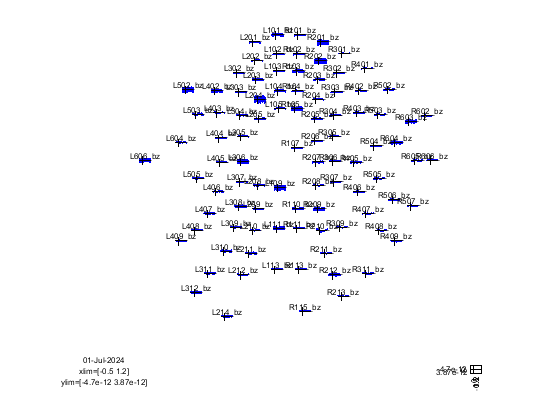
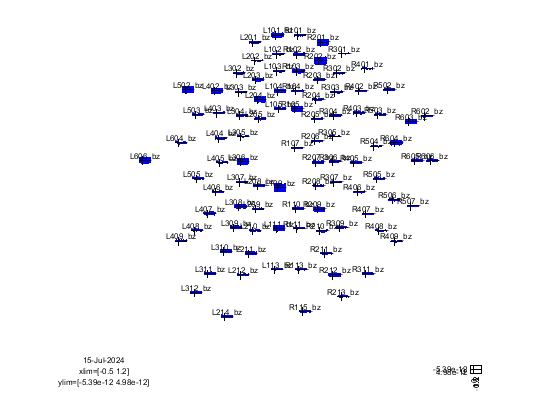
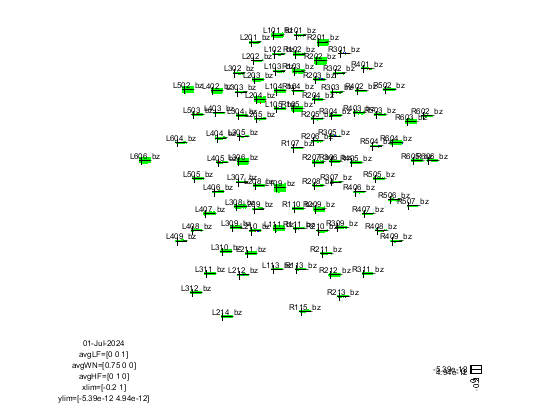
We can now plot the averaged trial in sensor space for each type of trials. From the pop-up window, drag a box selection over a number of sensors, then click one of them to see the trial-averaged behavior of the data over time.
[15]:
%% Plotting the averaged LF trials

% This will show the average over all trials for each channel for only one
% trigger condition

cfg = [];
cfg.showlabels = 'yes';
cfg.fontsize = 6;
cfg.layout = 'fieldlinebeta2bz_helmet.mat';
% cfg.ylim = [-3e-13 3e-13];
ft_multiplotER(cfg, avgLF);
the call to "ft_selectdata" took 0 seconds
reading layout from file fieldlinebeta2bz_helmet.mat
reading 'layout' from file 'fieldlinebeta2bz_helmet.mat'
the call to "ft_prepare_layout" took 0 seconds
[15]:

the call to "ft_multiplotER" took 1 seconds
[16]:
%% Plotting the averaged WN trials

% This will show the average over all trials for each channel for only one
% trigger condition

cfg = [];
cfg.showlabels = 'yes';
cfg.fontsize = 6;
cfg.layout = 'fieldlinebeta2bz_helmet.mat'; %Perhaps we can use the layout from the .fif
% cfg.ylim = [-3e-13 3e-13];
ft_multiplotER(cfg, avgWN);
the call to "ft_selectdata" took 0 seconds
reading layout from file fieldlinebeta2bz_helmet.mat
reading 'layout' from file 'fieldlinebeta2bz_helmet.mat'
the call to "ft_prepare_layout" took 0 seconds
[16]:
the call to "ft_multiplotER" took 1 seconds
[16]:
%% Plotting the averaged HF trials

% This will show the average over all trials for each channel for only one
% trigger condition

cfg = [];
cfg.showlabels = 'yes';
cfg.fontsize = 6;
cfg.layout = 'fieldlinebeta2bz_helmet.mat';
% cfg.ylim = [-3e-13 3e-13];
ft_multiplotER(cfg, avgHF);
the call to "ft_selectdata" took 0 seconds
reading layout from file fieldlinebeta2bz_helmet.mat
reading 'layout' from file 'fieldlinebeta2bz_helmet.mat'
the call to "ft_prepare_layout" took 0 seconds
[16]:
the call to "ft_multiplotER" took 1 seconds
[18]:
%% Plotting all data

% Same as before but for all the stimulus type

cfg = [];
cfg.showlabels = 'yes';
cfg.fontsize = 6;

%This is saved under Fieldtrip_dir/template/layout
cfg.layout = 'fieldlinebeta2bz_helmet.mat';
cfg.baseline = [-0.2 0];
cfg.xlim = [-0.2 1.0];
% cfg.ylim = [-3e-13 3e-13];
ft_multiplotER(cfg, avgLF, avgWN, avgHF);
the input is timelock data with 94 channels and 8500 timebins
applying baseline correction on avg
baseline correction invalidates previous variance estimate, removing var
the call to "ft_timelockbaseline" took 0 seconds
the input is timelock data with 94 channels and 8500 timebins
applying baseline correction on avg
baseline correction invalidates previous variance estimate, removing var
the call to "ft_timelockbaseline" took 0 seconds
the input is timelock data with 94 channels and 8500 timebins
applying baseline correction on avg
baseline correction invalidates previous variance estimate, removing var
the call to "ft_timelockbaseline" took 0 seconds
the call to "ft_selectdata" took 0 seconds
reading layout from file fieldlinebeta2bz_helmet.mat
reading 'layout' from file 'fieldlinebeta2bz_helmet.mat'
the call to "ft_prepare_layout" took 0 seconds
[18]:
the call to "ft_multiplotER" took 1 seconds
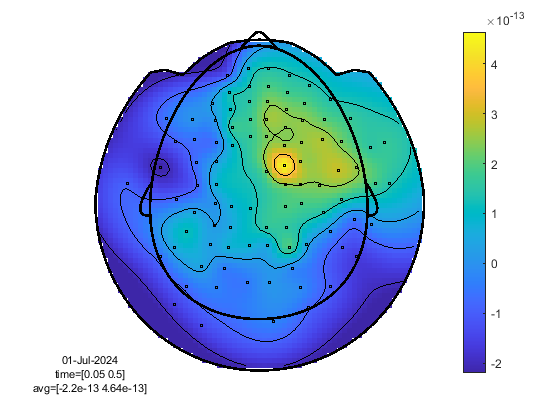
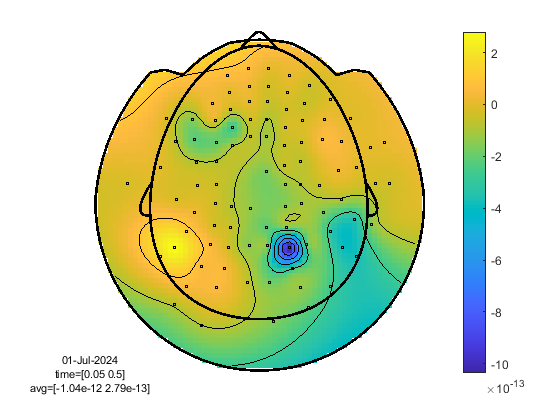
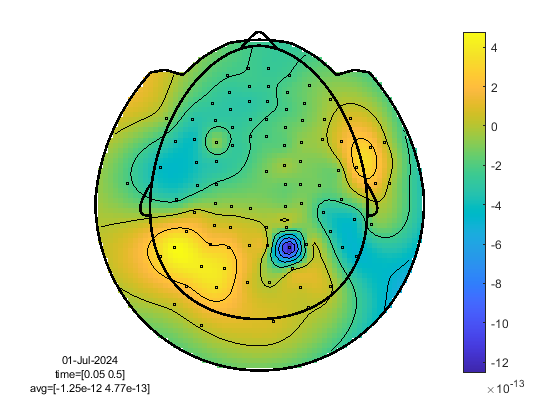
We can also plot the trial & time average in sensor space. the cfg.xlim specifies which window of time should we time-average on. The 0 value corresponds to the stimulus presentation time, so in order to see the ERP, we pick slightly after that includes the 100ms lapse.
[20]:
%% Plotting in space

% for a single trial type, for each channel, average over time the trial
% and plot the average value on the helmet

% You can still see the time behavior when clicking on one sensor

%LF
cfg = [];
cfg.xlim = [0.05 0.5];
cfg.colorbar = 'yes';
cfg.layout = 'fieldlinebeta2bz_helmet.mat';
ft_topoplotER(cfg, avgLF);


%White Noise

cfg = [];
cfg.xlim = [0.05 0.5];
cfg.colorbar = 'yes';
cfg.layout = 'fieldlinebeta2bz_helmet.mat';
ft_topoplotER(cfg, avgWN);


%High Frequency

cfg = [];
cfg.xlim = [0.05 0.5];
cfg.colorbar = 'yes';
cfg.layout = 'fieldlinebeta2bz_helmet.mat';
ft_topoplotER(cfg, avgHF);
reading layout from file fieldlinebeta2bz_helmet.mat
reading 'layout' from file 'fieldlinebeta2bz_helmet.mat'
the call to "ft_prepare_layout" took 0 seconds
[20]:
the call to "ft_selectdata" took 0 seconds
the call to "ft_topoplotER" took 2 seconds
reading layout from file fieldlinebeta2bz_helmet.mat
reading 'layout' from file 'fieldlinebeta2bz_helmet.mat'
the call to "ft_prepare_layout" took 0 seconds
[20]:
the call to "ft_selectdata" took 0 seconds
the call to "ft_topoplotER" took 0 seconds
reading layout from file fieldlinebeta2bz_helmet.mat
reading 'layout' from file 'fieldlinebeta2bz_helmet.mat'
the call to "ft_prepare_layout" took 0 seconds
[20]:
the call to "ft_selectdata" took 0 seconds
the call to "ft_topoplotER" took 0 seconds
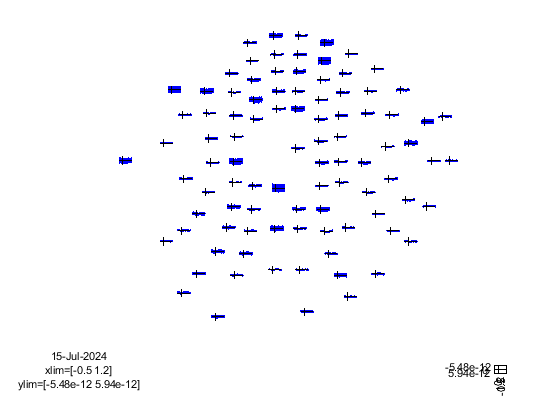
The above plots are contrasted with a baseline, but we would like now to contrast the HF (or WN) trials with the LF ones.
[18]:
%% Plotting the contrast

cfg = [];
cfg .parameter = 'avg';
cfg.operation = 'x1-x2';
% Correct by reducing the number of trials of the LF
% When we contrast, we do not want to bias one type of trial over the other if one type of trials has a higher number of trials than another type, which is the case in this experiment
diff = ft_math(cfg, avgHF, avgLF);

cfg.layout = 'fieldlinebeta2bz_helmet.mat';

ft_multiplotER(cfg,diff);
the call to "ft_selectdata" took 0 seconds
selecting avg from the first input argument
the call to "ft_math" took 1 seconds
the call to "ft_selectdata" took 0 seconds
reading layout from file fieldlinebeta2bz_helmet.mat
reading 'layout' from file 'fieldlinebeta2bz_helmet.mat'
the call to "ft_prepare_layout" took 0 seconds
[18]:
the call to "ft_multiplotER" took 0 seconds
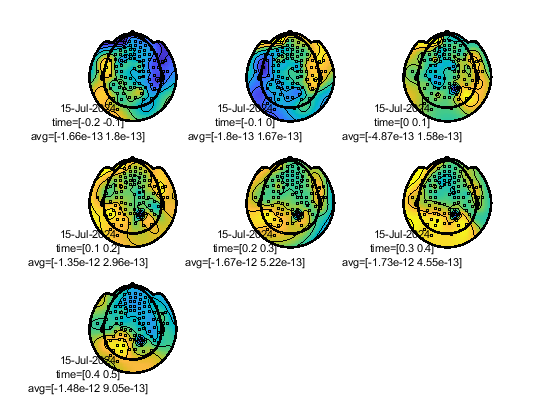
We can plot the contrast at different time points around the reaction time.
[19]:
%% Topoplot on diff

cfg        = [];
cfg.xlim   = [-0.2 : 0.1 : 0.5];  % Define 12 time intervals
%cfg.zlim   = [-2e-13 2e-13];      % Set the 'color' limits.
cfg.layout = 'fieldlinebeta2bz_helmet.mat';
ft_topoplotER(cfg, diff);
reading layout from file fieldlinebeta2bz_helmet.mat
reading 'layout' from file 'fieldlinebeta2bz_helmet.mat'
the call to "ft_prepare_layout" took 0 seconds
[19]:
the call to "ft_selectdata" took 0 seconds
the call to "ft_prepare_layout" took 0 seconds
the call to "ft_selectdata" took 0 seconds
the call to "ft_topoplotTFR" took 1 seconds
the call to "ft_prepare_layout" took 0 seconds
the call to "ft_selectdata" took 0 seconds
the call to "ft_topoplotTFR" took 0 seconds
the call to "ft_prepare_layout" took 0 seconds
the call to "ft_selectdata" took 0 seconds
the call to "ft_topoplotTFR" took 0 seconds
the call to "ft_prepare_layout" took 0 seconds
the call to "ft_selectdata" took 0 seconds
the call to "ft_topoplotTFR" took 0 seconds
the call to "ft_prepare_layout" took 0 seconds
the call to "ft_selectdata" took 0 seconds
the call to "ft_topoplotTFR" took 0 seconds
the call to "ft_prepare_layout" took 0 seconds
the call to "ft_selectdata" took 0 seconds
the call to "ft_topoplotTFR" took 0 seconds
the call to "ft_prepare_layout" took 0 seconds
the call to "ft_selectdata" took 0 seconds
the call to "ft_topoplotTFR" took 0 seconds
the call to "ft_topoplotER" took 2 seconds
[20]:
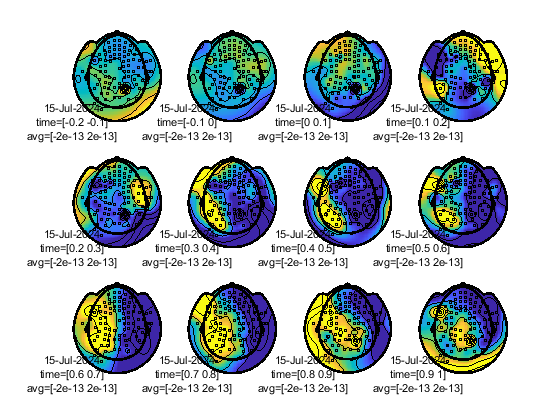
%Same as before, but not plotting the average rather one of the trial types at specific times

cfg        = [];
cfg.xlim   = [-0.2 : 0.1 : 1.0];  % Define 12 time intervals
cfg.zlim   = [-2e-13 2e-13];      % Set the 'color' limits.
cfg.layout = 'fieldlinebeta2bz_helmet.mat';
ft_topoplotER(cfg, avgWN);
reading layout from file fieldlinebeta2bz_helmet.mat
reading 'layout' from file 'fieldlinebeta2bz_helmet.mat'
the call to "ft_prepare_layout" took 0 seconds
[20]:
the call to "ft_selectdata" took 0 seconds
the call to "ft_prepare_layout" took 0 seconds
the call to "ft_selectdata" took 0 seconds
the call to "ft_topoplotTFR" took 0 seconds
the call to "ft_prepare_layout" took 0 seconds
the call to "ft_selectdata" took 0 seconds
the call to "ft_topoplotTFR" took 0 seconds
the call to "ft_prepare_layout" took 0 seconds
the call to "ft_selectdata" took 0 seconds
the call to "ft_topoplotTFR" took 0 seconds
the call to "ft_prepare_layout" took 0 seconds
the call to "ft_selectdata" took 0 seconds
the call to "ft_topoplotTFR" took 0 seconds
the call to "ft_prepare_layout" took 0 seconds
the call to "ft_selectdata" took 0 seconds
the call to "ft_topoplotTFR" took 0 seconds
the call to "ft_prepare_layout" took 0 seconds
the call to "ft_selectdata" took 0 seconds
the call to "ft_topoplotTFR" took 0 seconds
the call to "ft_prepare_layout" took 0 seconds
the call to "ft_selectdata" took 0 seconds
the call to "ft_topoplotTFR" took 0 seconds
the call to "ft_prepare_layout" took 0 seconds
the call to "ft_selectdata" took 0 seconds
the call to "ft_topoplotTFR" took 0 seconds
the call to "ft_prepare_layout" took 0 seconds
the call to "ft_selectdata" took 0 seconds
the call to "ft_topoplotTFR" took 0 seconds
the call to "ft_prepare_layout" took 0 seconds
the call to "ft_selectdata" took 0 seconds
the call to "ft_topoplotTFR" took 0 seconds
the call to "ft_prepare_layout" took 0 seconds
the call to "ft_selectdata" took 0 seconds
the call to "ft_topoplotTFR" took 0 seconds
the call to "ft_prepare_layout" took 0 seconds
the call to "ft_selectdata" took 0 seconds
the call to "ft_topoplotTFR" took 0 seconds
the call to "ft_topoplotER" took 3 seconds
Read and visualise the anatomical data
We are now ready to perform source localization given the subject anatomical T1-MRI scan. Start by loading the MRI.
[31]:
% Configure the path
MRI_PATH = [MEG_DATA_FOLDER, '\oddball\sub-03\anat\anat-T1w\', 'anat_T1w_anat-T1w_20231122111832_6.nii.gz'];
disp(MRI_PATH);

%% Load MRI data
mri = ft_read_mri(MRI_PATH);
C:\Users\user\Box\Data\\oddball\sub-03\anat\anat-T1w\anat_T1w_anat-T1w_20231122111832_6.nii.gz
extracting compressed dataset to C:\Users\user\AppData\Local\Temp\x88ffc270718eb1757ab23b346a037ad4\...
extracted dataset is located at C:\Users\user\AppData\Local\Temp\x88ffc270718eb1757ab23b346a037ad4\anat_T1w_anat-T1w_20231122111832_6.nii
Warning: adding C:\Users\user\Documents\MATLAB\matlab_toolboxes\fieldtrip\fieldtrip\external\freesurfer toolbox to your MATLAB path
the coordinate system appears to be 'scanras'
Note that mri.units is in ‘mm’. To ensure correct coregistration, we should have the MRI, the OPM sensors and the headshape from the Polhemus laserscan expressed in the same units.
Let’s check the coordinate system of the MRI:
[32]:
ft_determine_coordsys(mri, 'interactive', 'no');
[32]:
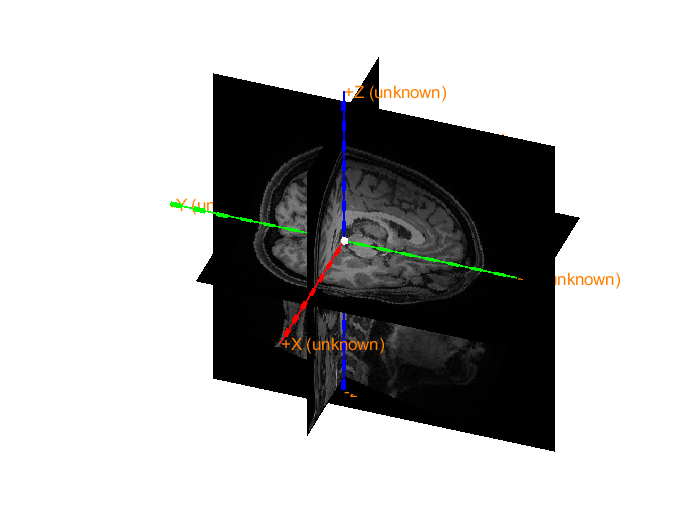
The axes are 150 mm long in each direction
The diameter of the sphere at the origin is 10 mm
This is a RAS or Neuromag coordinate system, i.e., the +x is pointing to R(ight), +y to A(nterior) and +z to S(uperior).
[33]:
save mri mri
One of the strategies that we can use to coregister the MRI with the headshape is on the basis of three fiducials: the nasion, the right and left pre-auricular points.
We need to select manually the three fiducials. In the GUI we select the nasion by clicking on it and pressing ‘n’, the right pre-auricular point by pressing ‘r’ and the left pre-auricular point by pressing ‘l’. We are going to define a new RAS or neuromag coordinate system based on these three ficducials.
[34]:
%% Pick fiducials on mri
load mri

cfg          = [];
cfg.coordsys = 'neuromag';
mri_init     = ft_volumerealign(cfg, mri);
the input is volume data with dimensions [208 300 320]
voxel size along 1st dimension (i) : 0.800000 mm
voxel size along 2nd dimension (j) : 0.800000 mm
voxel size along 3rd dimension (k) : 0.800000 mm
volume per voxel                   : 0.512000 mm^3
the input is volume data with dimensions [208 300 320]
voxel size along 1st dimension (i) : 0.800000 mm
voxel size along 2nd dimension (j) : 0.800000 mm
voxel size along 3rd dimension (k) : 0.800000 mm
volume per voxel                   : 0.512000 mm^3
==================================================================================
0. Press "h" to show this help
1. To change the slice viewed in one plane, either:
   a. click (left mouse) in the image on a different plane. Eg, to view a more
      superior slice in the horizontal plane, click on a superior position in the
      coronal plane, or
   b. use the arrow keys to increase or decrease the slice number by one
2. To mark a fiducial position or anatomical landmark, do BOTH:
   a. select the position by clicking on it in any slice with the left mouse button
   b. identify it by pressing the letter corresponding to the fiducial/landmark:
      press n for nas, l for lpa, r for rpa
      press z for an extra control point that should have a positive z-value
   You can mark the fiducials repeatedly, until you are satisfied with the positions.
3. To change the display:
   a. press c on keyboard to toggle crosshair visibility
   b. press f on keyboard to toggle fiducial visibility
   c. press + or - on (numeric) keyboard to change the contrast
4. To finalize markers and quit interactive mode, press q on keyboard
the call to "ft_volumerealign" took 72 seconds
Let’s check the newly defined coordinate system of the MRI:
[35]:
ft_determine_coordsys(mri_init, 'interactive', 'no');
The positive x-axis is pointing towards the right
The positive y-axis is pointing towards anterior
The positive z-axis is pointing towards superior
[35]:
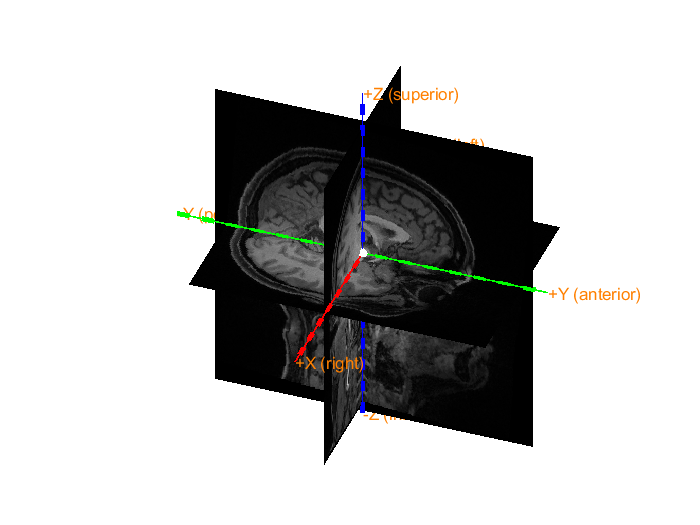
The axes are 150 mm long in each direction
The diameter of the sphere at the origin is 10 mm
[4]:
save mri_init mri_init
[5]:
load mri_init mri_init
The data from anatomical MRI is now ready to be used for coregistration.
Read Headshape from Polhemus Laser-scan
Before MEG data acquisition from a participant, a digitized headshape has been acquired using a FastScan II by Polhemus Link to FastScan II device. This data can be found under sub-003/anat/digitized-headshape, basic_surface holds the headshape points, and stylus holds the fiducials position in the headshape coordinate system. This data is not directly usable in Fieldtrip at the moment, a special function read_head_shape_laser is
used to get the headshape structure containing both surface and fiducials. The function is found under meg-pipeline/pipeline/field_trip_pipelines/matlab_functions add this folder to your MATLAB path for convenience.
[ ]:
addpath('C:\Users\user\Documents\GitHub\meg-pipeline/pipeline/field_trip_pipelines/matlab_functions');
[19]:
basic_surface = fullfile([MEG_DATA_FOLDER,'oddball\sub-03\anat\digitized-headshape\sub-03-basic-surface.txt']);
stylus_file = fullfile([MEG_DATA_FOLDER,'oddball\sub-03\anat\digitized-headshape\sub-03-stylus-cleaned.txt']);
headshape = read_head_shape_laser(basic_surface, stylus_file);
headshape   = ft_convert_units(headshape, 'mm');
[19]:
shape = struct with fields:
      pos: [1681x3 double]
      fid: [1x1 struct]
    label: []
We can now plot the headshape and the fiducials.
[4]:
%% visualization, coordinate axes are initially ALS
figure
ft_plot_headshape(headshape)
ft_plot_axes(headshape)
view([50 20])
[4]:
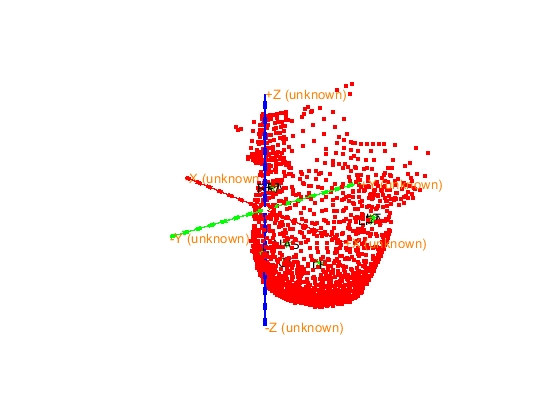
The axes are 150 mm long in each direction
The diameter of the sphere at the origin is 10 mm
Notice that the coordinate system is random, let us set the coordinate system to neuromag using the fiducials we had recorded. For more information on coordinate systems go to https://www.fieldtriptoolbox.org/faq/coordsys/ Transform the coordinate system to neuromag which is a RAS (X-axis: Left pre-auricular, Y-axis: anterior, Z-axis: Superior)
[5]:
nas = headshape.fid.pos(strcmp(headshape.fid.label, 'NAS'),:);
lpa = headshape.fid.pos(strcmp(headshape.fid.label, 'LPA'),:);
rpa = headshape.fid.pos(strcmp(headshape.fid.label, 'RPA'),:);

T = ft_headcoordinates(nas, lpa, rpa, 'neuromag');
headshape = ft_transform_geometry(T, headshape);
headshape.coordsys = 'neuromag';

%% visualization, coordinate axes after transformation to Neuromag
figure
ft_plot_headshape(headshape)
ft_plot_axes(headshape)
view([50 20])
[5]:
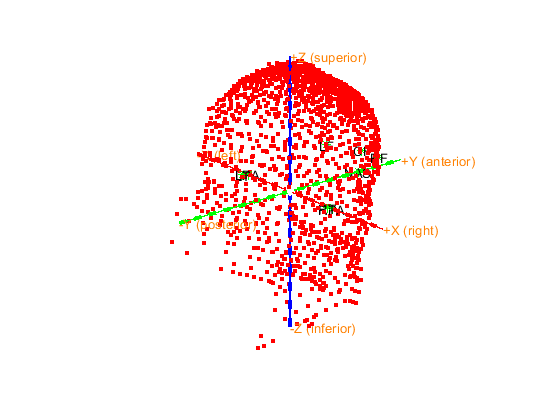
The axes are 150 mm long in each direction
The diameter of the sphere at the origin is 10 mm
Let us plot the sensor layout (from OPM .fif generated file), headshape (from laserscan).
[20]:
%% Plot headshape with layout from fif

%%To use the specific layout used during the recording, get the grad layout
%%from .fif loading

% Note: this layout from .fif doesn't seem to have the 8 reference points

sensors = ft_convert_units(data_all.grad, 'mm');

figure
ft_plot_sens(sensors);
hold on
ft_plot_axes(headshape)
hold on
ft_plot_headshape(headshape);
view([114 20])
[20]:
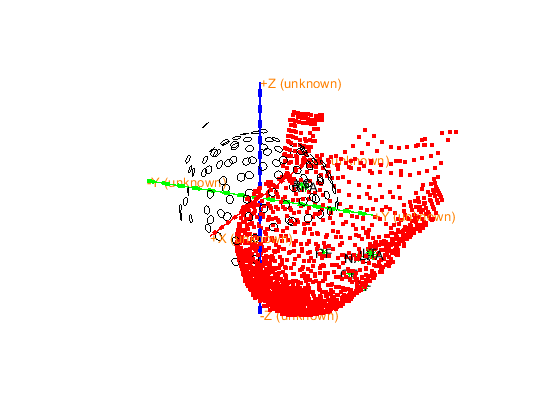
The axes are 150 mm long in each direction
The diameter of the sphere at the origin is 10 mm
The headshape needs to be cut by a plane in order to remove unncessary points that are beneath the head region. Change planecut to account for your headshape and adapt as necessary. Note that we keep the nose. This will help later to coregister the MRI with the headshape.
[7]:
% Deface the laser mesh under a certain plan (change the 140) Define the configuration for ft_defacemesh
planecut = 5;
cfg = [];
cfg.method    = 'plane';       % Use a plane for exclusion
cfg.translate = [0 0 planecut]; % A point on the plane (adjust z_value as needed)
cfg.rotate    = [0 0 0];       % Rotation vector, modify if the plane is not axis-aligned
cfg.selection = 'outside';     % Remove points below the plane

% Apply ft_defacemesh to remove points below the plane
mesh = ft_defacemesh(cfg, headshape);
-------------------------------------------------------------------------------------------
FieldTrip is developed by members and collaborators of the Donders Institute for Brain,
Cognition and Behaviour at Radboud University, Nijmegen, the Netherlands.

                          --------------------------
                        /                            \
                     ------------------------------------
                    /                                    \
          -------------------------------------------------
         /                            /\/\/\/\/\
         ---------------------------------------------------
                  |        F  i  e  l  d  T  r  i  p       |
                  ------------------------------------------
                   \                                      /
                     ------------------------------------
                          \            /
                            ----------

Please cite the FieldTrip reference paper when you have used FieldTrip in your study.
Robert Oostenveld, Pascal Fries, Eric Maris, and Jan-Mathijs Schoffelen. FieldTrip: Open
Source Software for Advanced Analysis of MEG, EEG, and Invasive Electrophysiological Data.
Computational Intelligence and Neuroscience, vol. 2011, Article ID 156869, 9 pages, 2011.
doi:10.1155/2011/156869.
-------------------------------------------------------------------------------------------
Use the mouse to rotate the geometry, and click "redisplay" to update the light.
Close the figure when you are done.
the template coordinate system is "neuromag"
the positive X-axis is pointing to the right
the positive Y-axis is pointing to anterior
the positive Z-axis is pointing to superior
The axes are 150 mm long in each direction
The diameter of the sphere at the origin is 10 mm

==================================================================================
Press "h" to show this help.
Press "q" or close the window when you are done.
Press "v" to update the light position.
the call to "ft_interactiverealign" took 4 seconds
[7]:
ans = logical
   1
[7]:
ans = logical
   1
keeping 1216 and removing 465 vertices in the mesh
the call to "ft_defacemesh" took 4 seconds
[11]:
% Plot the resulting mesh to check the results
figure
ft_plot_mesh(mesh);
hold on
ft_plot_axes(mesh);
view([114 20])
headshape = mesh

save headshape headshape
[11]:
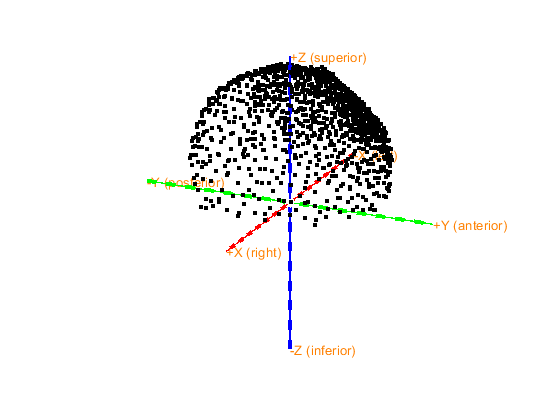
The axes are 150 mm long in each direction
The diameter of the sphere at the origin is 10 mm
[11]:
headshape = struct with fields:
         pos: [1216x3 double]
         fid: [1x1 struct]
       label: []
        unit: 'mm'
    coordsys: 'neuromag'
         cfg: [1x1 struct]
Coregister OPM sensors with headshape
The standard layout of the sensors (i.e., sensors not pushed towards the skull of the subject) can be found in the template/grad folder in the fieldtrip directory. In the following we plot the two sensors layout to see the difference.
[94]:
%% Plot layout difference between fieldlinebeta2.mat and the sensor layout from the .fif

% This stage requires the 8 reference points

% Load reference points from OPM layout


% Problem: the layout from the .fif doesn't match the layout from the OPM
% template

%standard layout for helmet
fieldlinebeta2 = ft_read_sens('fieldlinebeta2.mat'); % from fieldtrip/template/grad
fieldlinebeta2 = ft_convert_units(fieldlinebeta2, 'mm');
fid_helmet     = fieldlinebeta2.fid;

%layout from fif with actual sensor place during the scan
sensors = ft_convert_units(data_all.grad, 'mm');

figure
ft_plot_sens(sensors)
hold on
ft_plot_sens(fieldlinebeta2)
view([114 20])
reading variable from file 'fieldlinebeta2.mat'
[94]:
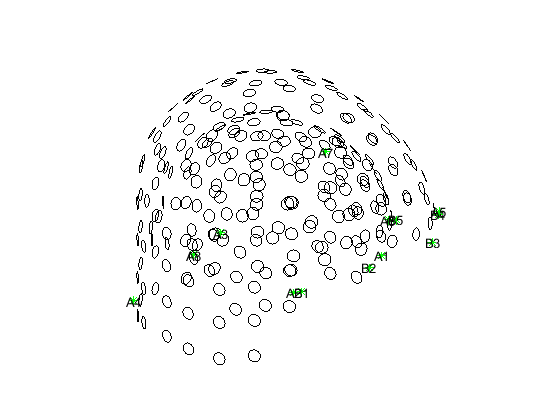
Now we focus on coregistering the headshape with sensor layout. The method described here is not optimal since for this dataset we did not record fiducials on the sensor layout. What we will do, is basically fit the sensors who are shaped as a head (since they are pushed towards the skull of the participant) with the headshape using ICP (Iterative Closest Point). Ideally, we would like to record fiducials in sensor space and coregister them with the stylus points acquired from the laser scan as described in this tutorial https://www.fieldtriptoolbox.org/tutorial/coregistration_opm/
We will compute the Rotation and Translation matrix respecitvely TR and TT by fitting the headshape surface with the positions of the sensors.
[101]:
%% Coregistration


% Aligning the headshape with sensor position
transhp = headshape.pos';

transsensor = sensors.chanpos';

[TR, TT] = icp(transhp, transsensor);
The rigid body transformation is now known, we can apply it to the sensors positions, then plot again the transformed sensors layout with the headshape.
[8]:
%%
% Plotting after aligning with ICP

transformed_coords = TR*transsensor + TT

%transformed_points = ft_transform_geometry(TR, headshape.pos');

%% Plot after transforming

%headshape.pos = transformed_coords'

sensors.chanpos = transformed_coords'

save sensors sensors

figure
ft_plot_headshape(headshape)
ft_plot_axes(headshape)
hold on
ft_plot_sens(sensors)
%hold on
%ft_plot_sens(fieldlinebeta2)
view([114 20])


%The headshape is now aligned with the acquired sensor placements
[8]:
transformed_coords = 3x96 double
  -21.9101  -36.0467   13.0519  -48.1705   13.3108  -65.3469  -20.9570  -79.3815   -5.2276  -22.5258  -19.0636  -37.8783   16.2449  -48.0029   -3.8505  -53.3787   12.0012  -42.7699   14.1847  -48.8186   -5.0455  -47.0439   -1.9355  -61.1725   13.5054  -35.0373  -22.0394  -37.4019  -19.7880  -35.4329
   92.0484   81.8327   99.0199   32.5883   93.7002   -2.0219   85.7575   -5.8085   99.7893   -0.5102   73.4920   75.1234   36.2003   12.9465   97.8649   44.8193   82.1149   -0.6552   74.7485   50.5141  100.7886   62.7096   82.9494   18.6961   99.4816   54.9410   94.2381   17.1725   59.5549   37.2860
   55.9093   59.6118   54.5253   90.6427   72.6812   75.9515   76.5682   -1.2194   35.0713  127.6158   93.4161   79.8235  128.5412   98.3906   75.5276   33.7185   91.3094  123.5061  110.7860   76.9410   55.8442   59.0488   92.9371   52.5581   34.1653   94.1492   36.6776  113.4136  108.8448  107.2211
...
[8]:
sensors = struct with fields:
     balance: [1x1 struct]
     chanori: [96x3 double]
     chanpos: [96x3 double]
    chantype: {96x1 cell}
    chanunit: {96x1 cell}
     coilori: [96x3 double]
     coilpos: [96x3 double]
       label: {96x1 cell}
         tra: [96x96 double]
        type: 'fieldline_v3'
        unit: 'mm'
[8]:
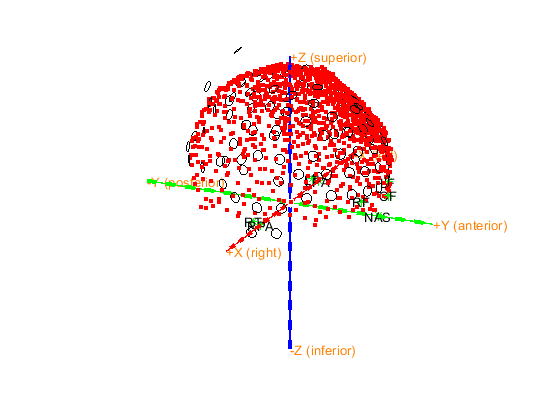
The axes are 150 mm long in each direction
The diameter of the sphere at the origin is 10 mm
The sensor layout seem to fit well the headshape after the coregistration. Only two sensors seem to not fit well.
Coregister MRI with headshape
The headshape coordinates are now coregistered with the sensor coordinates space. However, the brainshape (i.e., the anatomical MRI headshape) is not yet coregistered with the headshape.
To coregister the brain shape with the headshape we can use two strategies:
Coregister on the basis of the three fiducial points. In that case, we need to know exactly the location of the nasion and the pre-auricular points during the MRI and headshape acquisition. It is difficult to precisely determine the position of the pre auricular points. One solution is to use vitamin E earplugs which give a good contrast in MRI images. Alternatively, you can mark the fiducial points with a pen, photograph the participant with these markings, and use the photograph as a reference during co-registration.
Coregister on the basis of an automatic iterative-closest-points algorithm. This requires first an interactive step to improve the alignment of the MRI-derived head shape with the Polhemus points. To do that, we need to manually specify the translation and rotation in the GUI.
For strategy 1, we need to transform the MRI coordinate system to the coordinate system of the headshape. In this case, both coordinate systems are ‘neuromag’, so we do not need to do anything. Let’s check how good the co-registration is by plotting both MRI and headshape:
Let us check first the alignment before converting to neuromag coordinate system, by loading the MRI before transformation.
[14]:
%% Pick fiducials on mri
load mri

cfg          = [];
cfg.method              = 'headshape';
cfg.headshape.headshape = headshape;
cdf.headshape.icp       = 'no';

mri_non_neuromag     = ft_volumerealign(cfg, mri);
the input is volume data with dimensions [208 300 320]
voxel size along 1st dimension (i) : 0.800000 mm
voxel size along 2nd dimension (j) : 0.800000 mm
voxel size along 3rd dimension (k) : 0.800000 mm
volume per voxel                   : 0.512000 mm^3
Warning: defaulting to "" coordinate system
 In 'C:\Users\hz3752\Documents\fieldtrip\ft_volumerealign.m' at line 296

the input is volume data with dimensions [208 300 320]
voxel size along 1st dimension (i) : 0.800000 mm
voxel size along 2nd dimension (j) : 0.800000 mm
voxel size along 3rd dimension (k) : 0.800000 mm
volume per voxel                   : 0.512000 mm^3
creating scalpmask ... using the anatomy field for segmentation
smoothing anatomy with a 2-voxel FWHM kernel
thresholding anatomy at a relative threshold of 0.100
the call to "ft_volumesegment" took 2 seconds
triangulating the boundary of compartment 1 (scalp) with 20000 vertices
the call to "ft_prepare_mesh" took 2 seconds
doing interactive realignment with headshape
Use the mouse to rotate the geometry, and click "redisplay" to update the light.
Close the figure when you are done.
the template coordinate system is "neuromag"
the positive X-axis is pointing to the right
the positive Y-axis is pointing to anterior
the positive Z-axis is pointing to superior
this returns a light skin, you can also explicitly specify 'skin_light',' skin_medium_light', 'skin_medium', 'skin_medium_dark', or 'skin_dark'

==================================================================================
Press "h" to show this help.
Press "q" or close the window when you are done.
Press "v" to update the light position.
the call to "ft_interactiverealign" took 80 seconds
doing iterative closest points realignment with headshape
the input is mesh data with 20000 vertices and 39996 triangles
the input is source data with 20000 brainordinates
the input is source data with 1154 brainordinates
interpolating distance
the call to "ft_sourceinterpolate" took 0 seconds
the input is mesh data with 20000 vertices and 39996 triangles
the input is source data with 20000 brainordinates
the input is source data with 1154 brainordinates
interpolating distance
the call to "ft_sourceinterpolate" took 0 seconds
the call to "ft_volumerealign" took 86 seconds

Let us load the MRI after coordinate change to neuromag.
[16]:
load mri_init
load headshape

%% check how good the co-registration is
cfg                     = [];
cfg.method              = 'headshape';
cfg.headshape.headshape = headshape;
cdf.headshape.icp       = 'no';
[mri_aligned]           = ft_volumerealign(cfg, mri_init);
the input is volume data with dimensions [208 300 320]
voxel size along 1st dimension (i) : 0.800000 mm
voxel size along 2nd dimension (j) : 0.800000 mm
voxel size along 3rd dimension (k) : 0.800000 mm
volume per voxel                   : 0.512000 mm^3
Warning: defaulting to "" coordinate system
 In 'C:\Users\hz3752\Documents\fieldtrip\ft_volumerealign.m' at line 296

the input is volume data with dimensions [208 300 320]
voxel size along 1st dimension (i) : 0.800000 mm
voxel size along 2nd dimension (j) : 0.800000 mm
voxel size along 3rd dimension (k) : 0.800000 mm
volume per voxel                   : 0.512000 mm^3
creating scalpmask ... using the anatomy field for segmentation
smoothing anatomy with a 2-voxel FWHM kernel
thresholding anatomy at a relative threshold of 0.100
the call to "ft_volumesegment" took 2 seconds
triangulating the boundary of compartment 1 (scalp) with 20000 vertices
the call to "ft_prepare_mesh" took 2 seconds
doing interactive realignment with headshape
Use the mouse to rotate the geometry, and click "redisplay" to update the light.
Close the figure when you are done.
the template coordinate system is "neuromag"
the positive X-axis is pointing to the right
the positive Y-axis is pointing to anterior
the positive Z-axis is pointing to superior

==================================================================================
Press "h" to show this help.
Press "q" or close the window when you are done.
Press "v" to update the light position.
the call to "ft_interactiverealign" took 90 seconds
doing iterative closest points realignment with headshape
the input is mesh data with 20000 vertices and 39996 triangles
the input is source data with 20000 brainordinates
the input is source data with 1154 brainordinates
interpolating distance
the call to "ft_sourceinterpolate" took 0 seconds
the input is mesh data with 20000 vertices and 39996 triangles
the input is source data with 20000 brainordinates
the input is source data with 1154 brainordinates
interpolating distance
the call to "ft_sourceinterpolate" took 0 seconds
the call to "ft_volumerealign" took 97 seconds

The co-registration appears to not be that bad; however, at NYU, we lack a precise method for determining the position of the pre-auricular points. Therefore, it is not recommended to use this approach. Instead, we will use strategy 2:
[4]:
load mri_init
load headshape

%% align MRI and Laser
cfg           = [];
cfg.method    = 'headshape';
cfg.headshape = headshape;
[mri_aligned] = ft_volumerealign(cfg, mri_init);

save mri_aligned mri_aligned
-------------------------------------------------------------------------------------------
FieldTrip is developed by members and collaborators of the Donders Institute for Brain,
Cognition and Behaviour at Radboud University, Nijmegen, the Netherlands.

                          --------------------------
                        /                            \
                     ------------------------------------
                    /                                    \
          -------------------------------------------------
         /                            /\/\/\/\/\
         ---------------------------------------------------
                  |        F  i  e  l  d  T  r  i  p       |
                  ------------------------------------------
                   \                                      /
                     ------------------------------------
                          \            /
                            ----------

Please cite the FieldTrip reference paper when you have used FieldTrip in your study.
Robert Oostenveld, Pascal Fries, Eric Maris, and Jan-Mathijs Schoffelen. FieldTrip: Open
Source Software for Advanced Analysis of MEG, EEG, and Invasive Electrophysiological Data.
Computational Intelligence and Neuroscience, vol. 2011, Article ID 156869, 9 pages, 2011.
doi:10.1155/2011/156869.
-------------------------------------------------------------------------------------------
the input is volume data with dimensions [208 300 320]
voxel size along 1st dimension (i) : 0.800000 mm
voxel size along 2nd dimension (j) : 0.800000 mm
voxel size along 3rd dimension (k) : 0.800000 mm
volume per voxel                   : 0.512000 mm^3
Warning: defaulting to "" coordinate system
 In 'C:\Users\user\Documents\MATLAB\matlab_toolboxes\fieldtrip\fieldtrip\ft_volumerealign.m' at line 296

the input is volume data with dimensions [208 300 320]
voxel size along 1st dimension (i) : 0.800000 mm
voxel size along 2nd dimension (j) : 0.800000 mm
voxel size along 3rd dimension (k) : 0.800000 mm
volume per voxel                   : 0.512000 mm^3
Warning: adding C:\Users\user\Documents\MATLAB\matlab_toolboxes\fieldtrip\fieldtrip\external\spm12 toolbox to your MATLAB path
creating scalpmask ... using the anatomy field for segmentation
smoothing anatomy with a 2-voxel FWHM kernel
thresholding anatomy at a relative threshold of 0.100
the call to "ft_volumesegment" took 5 seconds
triangulating the boundary of compartment 1 (scalp) with 20000 vertices
the call to "ft_prepare_mesh" took 4 seconds
doing interactive realignment with headshape
Use the mouse to rotate the geometry, and click "redisplay" to update the light.
Close the figure when you are done.
the template coordinate system is "neuromag"
the positive X-axis is pointing to the right
the positive Y-axis is pointing to anterior
the positive Z-axis is pointing to superior
this returns a light skin, you can also explicitly specify 'skin_light',' skin_medium_light', 'skin_medium', 'skin_medium_dark', or 'skin_dark'

==================================================================================
Press "h" to show this help.
Press "q" or close the window when you are done.
Press "v" to update the light position.
the call to "ft_interactiverealign" took 36 seconds
doing iterative closest points realignment with headshape
the input is mesh data with 20000 vertices and 39996 triangles
the input is source data with 20000 brainordinates
the input is source data with 1266 brainordinates
interpolating distance
the call to "ft_sourceinterpolate" took 1 seconds
the input is mesh data with 20000 vertices and 39996 triangles
the input is source data with 20000 brainordinates
the input is source data with 1266 brainordinates
interpolating distance
the call to "ft_sourceinterpolate" took 1 seconds
the call to "ft_volumerealign" took 54 seconds
[5]:
%% check how good the co-registration is
cfg                     = [];
cfg.method              = 'headshape';
cfg.headshape.headshape = headshape;
cdf.headshape.icp       = 'no';
[mri_aligned1]          = ft_volumerealign(cfg, mri_aligned);
the input is volume data with dimensions [208 300 320]
voxel size along 1st dimension (i) : 0.800000 mm
voxel size along 2nd dimension (j) : 0.800000 mm
voxel size along 3rd dimension (k) : 0.800000 mm
volume per voxel                   : 0.512000 mm^3
Warning: defaulting to "" coordinate system
 In 'C:\Users\user\Documents\MATLAB\matlab_toolboxes\fieldtrip\fieldtrip\ft_volumerealign.m' at line 296

the input is volume data with dimensions [208 300 320]
voxel size along 1st dimension (i) : 0.800000 mm
voxel size along 2nd dimension (j) : 0.800000 mm
voxel size along 3rd dimension (k) : 0.800000 mm
volume per voxel                   : 0.512000 mm^3
creating scalpmask ... using the anatomy field for segmentation
smoothing anatomy with a 2-voxel FWHM kernel
thresholding anatomy at a relative threshold of 0.100
the call to "ft_volumesegment" took 3 seconds
triangulating the boundary of compartment 1 (scalp) with 20000 vertices
the call to "ft_prepare_mesh" took 3 seconds
doing interactive realignment with headshape
Use the mouse to rotate the geometry, and click "redisplay" to update the light.
Close the figure when you are done.
the template coordinate system is "neuromag"
the positive X-axis is pointing to the right
the positive Y-axis is pointing to anterior
the positive Z-axis is pointing to superior

==================================================================================
Press "h" to show this help.
Press "q" or close the window when you are done.
Press "v" to update the light position.
the call to "ft_interactiverealign" took 65 seconds
doing iterative closest points realignment with headshape
the input is mesh data with 20000 vertices and 39996 triangles
the input is source data with 20000 brainordinates
the input is source data with 1266 brainordinates
interpolating distance
the call to "ft_sourceinterpolate" took 1 seconds
the input is mesh data with 20000 vertices and 39996 triangles
the input is source data with 20000 brainordinates
the input is source data with 1266 brainordinates
interpolating distance
the call to "ft_sourceinterpolate" took 0 seconds
the call to "ft_volumerealign" took 79 seconds

Construct the MEG volume conduction model (or else called headmodel)
The MRI is now segmented using SPM (Statistical Parametric Mapping) to find the boundaries of different types of tissue. ft_volumesegment(cfg, mri) will segmented the anatomy and will output the segmentation result as 3 probabilistic masks in gray, white and csf. When segmentation is performed after the coregistration of the MRI with the headshape, the headmodel (anatomical head from MRI) is then automatically coregistered aswell.
[114]:
%%

cfg = [];
cfg.write      = 'no';
[segmentedmri] = ft_volumesegment(cfg, mri_aligned);
save segmentedmri segmentedmri
the input is volume data with dimensions [208 300 320]
voxel size along 1st dimension (i) : 0.800000 mm
voxel size along 2nd dimension (j) : 0.800000 mm
voxel size along 3rd dimension (k) : 0.800000 mm
volume per voxel                   : 0.512000 mm^3
using 'OldNorm' normalisation
the coordinate system appears to be 'mni152'
Smoothing by 0 & 8mm..
Coarse Affine Registration..
Fine Affine Registration..
performing the segmentation on the specified volume, using the old-style segmentation

SPM12: spm_preproc                                 16:08:57 - 16/07/2024
========================================================================
Completed                               :          16:09:57 - 16/07/2024
the call to "ft_volumesegment" took 87 seconds
[2]:
%% Prepare the headmodel

load segmentedmri
cfg = [];
cfg.method = 'singleshell';
headmodel = ft_prepare_headmodel(cfg, segmentedmri);
save headmodel headmodel
creating brainmask ... using the sum of gray, white and csf tpms
smoothing brain with a 5-voxel FWHM kernel
thresholding brain at a relative threshold of 0.500
triangulating the boundary of compartment 1 (brain) with 3000 vertices
the call to "ft_prepare_mesh" took 3 seconds
the call to "ft_prepare_headmodel" took 3 seconds
[116]:
cfg = [];
cfg.grad              = sensors;   %structure, see FT_READ_SENS
cfg.headshape         = headshape   %structure, see FT_READ_HEADSHAPE
cfg.headmodel         = headmodel   % structure, see FT_PREPARE_HEADMODEL and FT_READ_HEADMODEL
cfg.mri               = mri_aligned;
cfg.mesh              = headshape;
cfg.axes              = 'yes'

ft_geometryplot(cfg)
[116]:
cfg = struct with fields:
         grad: [1x1 struct]
    headshape: [1x1 struct]
[116]:
cfg = struct with fields:
         grad: [1x1 struct]
    headshape: [1x1 struct]
    headmodel: [1x1 struct]
[116]:
cfg = struct with fields:
         grad: [1x1 struct]
    headshape: [1x1 struct]
    headmodel: [1x1 struct]
          mri: [1x1 struct]
         mesh: [1x1 struct]
         axes: 'yes'
[116]:
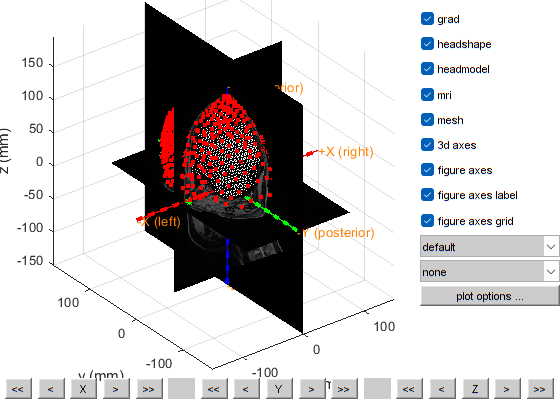
the template coordinate system is "neuromag"
the positive X-axis is pointing to the right
the positive Y-axis is pointing to anterior
the positive Z-axis is pointing to superior
this returns a light skin, you can also explicitly specify 'skin_light',' skin_medium_light', 'skin_medium', 'skin_medium_dark', or 'skin_dark'
plotting anatomy
The axes are 150 mm long in each direction
The diameter of the sphere at the origin is 10 mm

==================================================================================
Press "h" to show this help.
Press "q" to quit.
Click and hold the left mouse button to rotate.
the call to "ft_geometryplot" took 1 seconds
The final visualisation shows an accurate coregistration of the MRI.

Beamformer source localization
Beamformer is a source localization algorithm that acts upon a predefined grid where each point of the grid is a source. The grid is cut to the brain region as dictated by the MRI scan. Beamformer will estimate the activity at each source given sensor measurements. When estimating the activity for one source of the grid, beamformer would minimize interference from other sources. Let us redefine the trials (you can also reuse the trials you defined in step 1).
Note: In this section we perform frequency analysis in source space, however according to the literature this is not relevant for oddball tasks. Time-lock analysis in source space would allow us to see the p100 and p300 and the activation of the auditory cortex.
[1]:
%% Defining Trials

%value = 1 is the 500 Hz audio
%value = 2 is the white noise
%value = 3 is the 200 Hz audio

cfg = [];
cfg.dataset                 = DATASET_PATH;
cfg.trialfun = 'ft_trialfun_general'; % this is the default trial type
cfg.trialdef.eventtype = 'di31';  % Specify the trigger channel
cfg.trialdef.eventvalue = [1, 2, 3];  % Define the value of the trigger
cfg.demean     = 'yes';
cfg.detrend = 'yes';
cfg.baselinewindow = [-0.2 0];
%cfg.lpfilter   = 'yes';                              % apply lowpass filter
%cfg.lpfreq     = 35;                                 % lowpass at 35 Hz.
cfg.trialdef.prestim        = 0.5; % in seconds
cfg.trialdef.poststim       = 1.2; % in seconds

cfg = ft_definetrial(cfg);

data = ft_preprocessing(cfg);

save data data
-------------------------------------------------------------------------------------------
FieldTrip is developed by members and collaborators of the Donders Institute for Brain,
Cognition and Behaviour at Radboud University, Nijmegen, the Netherlands.

                          --------------------------
                        /                            \
                     ------------------------------------
                    /                                    \
          -------------------------------------------------
         /                            /\/\/\/\/\
         ---------------------------------------------------
                  |        F  i  e  l  d  T  r  i  p       |
                  ------------------------------------------
                   \                                      /
                     ------------------------------------
                          \            /
                            ----------

Please cite the FieldTrip reference paper when you have used FieldTrip in your study.
Robert Oostenveld, Pascal Fries, Eric Maris, and Jan-Mathijs Schoffelen. FieldTrip: Open
Source Software for Advanced Analysis of MEG, EEG, and Invasive Electrophysiological Data.
Computational Intelligence and Neuroscience, vol. 2011, Article ID 156869, 9 pages, 2011.
doi:10.1155/2011/156869.
-------------------------------------------------------------------------------------------
evaluating trial function 'ft_trialfun_general'
reading the header from 'C:\Users\hz3752\Box\MEG\Data\oddball\sub-03\meg-opm\sub-03_ses-2024-05-24_meg_raw.fif'
Warning: adding C:\Users\hz3752\Documents\fieldtrip\external\mne toolbox to your MATLAB path
==============================================================================

Copyright (c) 2011, Matti Hamalainen and Alexandre Gramfort
All rights reserved.

Redistribution and use in source and binary forms, with or without
modification, are permitted provided that the following conditions are met:
    * Redistributions of source code must retain the above copyright
      notice, this list of conditions and the following disclaimer.
    * Redistributions in binary form must reproduce the above copyright
      notice, this list of conditions and the following disclaimer in the
      documentation and/or other materials provided with the distribution.
    * Neither the name of the Massachusetts General Hospital nor the
      names of its contributors may be used to endorse or promote products
      derived from this software without specific prior written permission.

THIS SOFTWARE IS PROVIDED BY THE COPYRIGHT HOLDERS AND CONTRIBUTORS "AS IS" AND
ANY EXPRESS OR IMPLIED WARRANTIES, INCLUDING, BUT NOT LIMITED TO, THE IMPLIED
WARRANTIES OF MERCHANTABILITY AND FITNESS FOR A PARTICULAR PURPOSE ARE
DISCLAIMED. IN NO EVENT SHALL MASSACHUSETTS GENERAL HOSPITAL BE LIABLE FOR ANY
DIRECT, INDIRECT, INCIDENTAL, SPECIAL, EXEMPLARY, OR CONSEQUENTIAL DAMAGES
(INCLUDING, BUT NOT LIMITED TO, PROCUREMENT OF SUBSTITUTE GOODS OR SERVICES;
LOSS OF USE, DATA, OR PROFITS; OR BUSINESS INTERRUPTION) HOWEVER CAUSED AND
ON ANY THEORY OF LIABILITY, WHETHER IN CONTRACT, STRICT LIABILITY, OR TORT
(INCLUDING NEGLIGENCE OR OTHERWISE) ARISING IN ANY WAY OUT OF THE USE OF THIS
SOFTWARE, EVEN IF ADVISED OF THE POSSIBILITY OF SUCH DAMAGE.
==============================================================================
Warning: FieldLine data requires a numeric value for coilaccuracy>=0
 In 'C:\Users\hz3752\Documents\fieldtrip\fileio\ft_read_header.m' at line 1930
 In 'C:\Users\hz3752\Documents\fieldtrip\trialfun\ft_trialfun_general.m' at line 108
 In 'C:\Users\hz3752\Documents\fieldtrip\ft_definetrial.m' at line 198
Warning: No device to head transform available in fif file
 In 'C:\Users\hz3752\Documents\fieldtrip\fileio\private\mne2grad.m' at line 100
 In 'C:\Users\hz3752\Documents\fieldtrip\fileio\ft_read_header.m' at line 1941
 In 'C:\Users\hz3752\Documents\fieldtrip\trialfun\ft_trialfun_general.m' at line 108
 In 'C:\Users\hz3752\Documents\fieldtrip\ft_definetrial.m' at line 198
Warning: MEG channels will likely have coordinates in device frame, not head frame
 In 'C:\Users\hz3752\Documents\fieldtrip\fileio\private\mne2grad.m' at line 101
 In 'C:\Users\hz3752\Documents\fieldtrip\fileio\ft_read_header.m' at line 1941
 In 'C:\Users\hz3752\Documents\fieldtrip\trialfun\ft_trialfun_general.m' at line 108
 In 'C:\Users\hz3752\Documents\fieldtrip\ft_definetrial.m' at line 198
Warning: There does not seem to be a suitable trigger channel.
 In 'C:\Users\hz3752\Documents\fieldtrip\fileio\private\mne2grad.m' at line 214
 In 'C:\Users\hz3752\Documents\fieldtrip\fileio\ft_read_header.m' at line 1941
 In 'C:\Users\hz3752\Documents\fieldtrip\trialfun\ft_trialfun_general.m' at line 108
 In 'C:\Users\hz3752\Documents\fieldtrip\ft_definetrial.m' at line 198

Opening raw data file C:\Users\hz3752\Box\MEG\Data\oddball\sub-03\meg-opm\sub-03_ses-2024-05-24_meg_raw.fif...
        Range : 0 ... 1368099  =      0.000 ...   273.620 secs
Ready.
Warning: There does not seem to be a suitable trigger channel.
 In 'C:\Users\hz3752\Documents\fieldtrip\fileio\ft_chantype.m' at line 198
 In 'C:\Users\hz3752\Documents\fieldtrip\fileio\ft_read_header.m' at line 2837
 In 'C:\Users\hz3752\Documents\fieldtrip\trialfun\ft_trialfun_general.m' at line 108
 In 'C:\Users\hz3752\Documents\fieldtrip\ft_definetrial.m' at line 198

reading the events from 'C:\Users\hz3752\Box\MEG\Data\oddball\sub-03\meg-opm\sub-03_ses-2024-05-24_meg_raw.fif'
Warning: FieldLine data requires a numeric value for coilaccuracy>=0
 In 'C:\Users\hz3752\Documents\fieldtrip\fileio\ft_read_header.m' at line 1930
 In 'C:\Users\hz3752\Documents\fieldtrip\fileio\ft_read_event.m' at line 1685
 In 'C:\Users\hz3752\Documents\fieldtrip\trialfun\ft_trialfun_general.m' at line 117
 In 'C:\Users\hz3752\Documents\fieldtrip\ft_definetrial.m' at line 198
Warning: No device to head transform available in fif file
 In 'C:\Users\hz3752\Documents\fieldtrip\fileio\private\mne2grad.m' at line 100
 In 'C:\Users\hz3752\Documents\fieldtrip\fileio\ft_read_header.m' at line 1941
 In 'C:\Users\hz3752\Documents\fieldtrip\fileio\ft_read_event.m' at line 1685
 In 'C:\Users\hz3752\Documents\fieldtrip\trialfun\ft_trialfun_general.m' at line 117
 In 'C:\Users\hz3752\Documents\fieldtrip\ft_definetrial.m' at line 198
Warning: MEG channels will likely have coordinates in device frame, not head frame
 In 'C:\Users\hz3752\Documents\fieldtrip\fileio\private\mne2grad.m' at line 101
 In 'C:\Users\hz3752\Documents\fieldtrip\fileio\ft_read_header.m' at line 1941
 In 'C:\Users\hz3752\Documents\fieldtrip\fileio\ft_read_event.m' at line 1685
 In 'C:\Users\hz3752\Documents\fieldtrip\trialfun\ft_trialfun_general.m' at line 117
 In 'C:\Users\hz3752\Documents\fieldtrip\ft_definetrial.m' at line 198
Warning: There does not seem to be a suitable trigger channel.
 In 'C:\Users\hz3752\Documents\fieldtrip\fileio\private\mne2grad.m' at line 214
 In 'C:\Users\hz3752\Documents\fieldtrip\fileio\ft_read_header.m' at line 1941
 In 'C:\Users\hz3752\Documents\fieldtrip\fileio\ft_read_event.m' at line 1685
 In 'C:\Users\hz3752\Documents\fieldtrip\trialfun\ft_trialfun_general.m' at line 117
 In 'C:\Users\hz3752\Documents\fieldtrip\ft_definetrial.m' at line 198

Opening raw data file C:\Users\hz3752\Box\MEG\Data\oddball\sub-03\meg-opm\sub-03_ses-2024-05-24_meg_raw.fif...
        Range : 0 ... 1368099  =      0.000 ...   273.620 secs
Ready.
Reading 0 ... 1368099  =      0.000 ...   273.620 secs... [done]
found 80 events
created 80 trials
the call to "ft_definetrial" took 12 seconds
Warning: FieldLine data requires a numeric value for coilaccuracy>=0
 In 'C:\Users\hz3752\Documents\fieldtrip\fileio\ft_read_header.m' at line 1930
 In 'C:\Users\hz3752\Documents\fieldtrip\ft_preprocessing.m' at line 392
Warning: No device to head transform available in fif file
 In 'C:\Users\hz3752\Documents\fieldtrip\fileio\private\mne2grad.m' at line 100
 In 'C:\Users\hz3752\Documents\fieldtrip\fileio\ft_read_header.m' at line 1941
 In 'C:\Users\hz3752\Documents\fieldtrip\ft_preprocessing.m' at line 392
Warning: MEG channels will likely have coordinates in device frame, not head frame
 In 'C:\Users\hz3752\Documents\fieldtrip\fileio\private\mne2grad.m' at line 101
 In 'C:\Users\hz3752\Documents\fieldtrip\fileio\ft_read_header.m' at line 1941
 In 'C:\Users\hz3752\Documents\fieldtrip\ft_preprocessing.m' at line 392
Warning: There does not seem to be a suitable trigger channel.
 In 'C:\Users\hz3752\Documents\fieldtrip\fileio\private\mne2grad.m' at line 214
 In 'C:\Users\hz3752\Documents\fieldtrip\fileio\ft_read_header.m' at line 1941
 In 'C:\Users\hz3752\Documents\fieldtrip\ft_preprocessing.m' at line 392

Opening raw data file C:\Users\hz3752\Box\MEG\Data\oddball\sub-03\meg-opm\sub-03_ses-2024-05-24_meg_raw.fif...
        Range : 0 ... 1368099  =      0.000 ...   273.620 secs
Ready.
Warning: There does not seem to be a suitable trigger channel.
 In 'C:\Users\hz3752\Documents\fieldtrip\fileio\ft_chantype.m' at line 198
 In 'C:\Users\hz3752\Documents\fieldtrip\fileio\ft_read_header.m' at line 2837
 In 'C:\Users\hz3752\Documents\fieldtrip\ft_preprocessing.m' at line 392

processing channel { 'L202_bz' 'L302_bz' 'R102_bz' 'L404_bz' 'R103_bz' 'L505_bz' 'L203_bz' 'L606_bz' 'L101_bz' 'L208_bz' 'L204_bz' 'L303_bz' 'R107_bz' 'L405_bz' 'L103_bz' 'L502_bz' 'R104_bz' 'L307_bz' 'R105_bz' 'L403_bz' 'L102_bz' 'L402_bz' 'L104_bz' 'L604_bz' 'R101_bz' 'L304_bz' 'L201_bz' 'L306_bz' 'L205_bz' 'L305_bz' 'di31' 'L105_bz' 'L503_bz' 'R307_bz' 'R205_bz' 'L214_bz' 'R301_bz' 'L111_bz' 'R202_bz' 'L113_bz' 'R402_bz' 'R211_bz' 'R203_bz' 'R408_bz' 'R302_bz' 'R213_bz' 'R206_bz' 'R113_bz' 'R304_bz' 'R210_bz' 'R208_bz' 'R209_bz' 'R204_bz' 'R212_bz' 'R305_bz' 'R409_bz' 'R303_bz' 'R308_bz' 'R207_bz' 'R309_bz' 'R201_bz' 'R407_bz' 'R306_bz' 'R311_bz' 'R401_bz' 'R502_bz' 'R504_bz' 'R605_bz' 'R603_bz' 'R503_bz' 'R405_bz' 'R506_bz' 'R507_bz' 'R403_bz' 'R604_bz' 'R111_bz' 'R606_bz' 'L312_bz' 'R406_bz' 'R505_bz' 'R602_bz' 'L407_bz' 'L310_bz' 'L115_bz' 'L211_bz' 'L210_bz' 'L309_bz' 'R110_bz' 'L311_bz' 'L308_bz' 'L406_bz' 'L212_bz' 'R115_bz' 'L209_bz' 'L408_bz' 'L109_bz' 'L409_bz' 'hpiin175' 'hpiout175' 'hpiin176' 'hpiout176' 'hpiin177' 'hpiout177' 'hpiin178' 'hpiout178' 'hpiin179' 'hpiout179' 'hpiin180' 'hpiout180' }
reading and preprocessing
Reading 30816 ... 39315  =      6.163 ...     7.863 secs... [done]
reading and preprocessing trial 2 from 80Reading 48418 ... 56917  =      9.684 ...    11.383 secs... [done]
reading and preprocessing trial 3 from 80Reading 66066 ... 74565  =     13.213 ...    14.913 secs... [done]
reading and preprocessing trial 4 from 80Reading 82163 ... 90662  =     16.433 ...    18.132 secs... [done]
reading and preprocessing trial 5 from 80Reading 98257 ... 106756  =     19.651 ...    21.351 secs... [done]
reading and preprocessing trial 6 from 80Reading 115874 ... 124373  =     23.175 ...    24.875 secs... [done]
Reading 133464 ... 141963  =     26.693 ...    28.393 secs... [done]
reading and preprocessing trial 8 from 80Reading 151071 ... 159570  =     30.214 ...    31.914 secs... [done]
Reading 168652 ... 177151  =     33.730 ...    35.430 secs... [done]
reading and preprocessing trial 10 from 80Reading 185259 ... 193758  =     37.052 ...    38.752 secs... [done]
Reading 200871 ... 209370  =     40.174 ...    41.874 secs... [done]
reading and preprocessing trial 12 from 80Reading 217465 ... 225964  =     43.493 ...    45.193 secs... [done]
reading and preprocessing trial 13 from 80Reading 232564 ... 241063  =     46.513 ...    48.213 secs... [done]
reading and preprocessing trial 14 from 80Reading 248149 ... 256648  =     49.630 ...    51.330 secs... [done]
reading and preprocessing trial 15 from 80Reading 264269 ... 272768  =     52.854 ...    54.554 secs... [done]
reading and preprocessing trial 16 from 80Reading 280869 ... 289368  =     56.174 ...    57.874 secs... [done]
Reading 295949 ... 304448  =     59.190 ...    60.890 secs... [done]
reading and preprocessing trial 18 from 80Reading 312065 ... 320564  =     62.413 ...    64.113 secs... [done]
reading and preprocessing trial 19 from 80Reading 327664 ... 336163  =     65.533 ...    67.233 secs... [done]
reading and preprocessing trial 20 from 80Reading 345263 ... 353762  =     69.053 ...    70.752 secs... [done]
reading and preprocessing trial 21 from 80Reading 361364 ... 369863  =     72.273 ...    73.973 secs... [done]
reading and preprocessing trial 22 from 80Reading 378460 ... 386959  =     75.692 ...    77.392 secs... [done]
Reading 393554 ... 402053  =     78.711 ...    80.411 secs... [done]
reading and preprocessing trial 24 from 80Reading 409153 ... 417652  =     81.831 ...    83.530 secs... [done]
reading and preprocessing trial 25 from 80Reading 425774 ... 434273  =     85.155 ...    86.855 secs... [done]
Reading 440863 ... 449362  =     88.173 ...    89.872 secs... [done]
reading and preprocessing trial 27 from 80Reading 456966 ... 465465  =     91.393 ...    93.093 secs... [done]
reading and preprocessing trial 28 from 80Reading 474558 ... 483057  =     94.912 ...    96.611 secs... [done]
Reading 489659 ... 498158  =     97.932 ...    99.632 secs... [done]
reading and preprocessing trial 30 from 80Reading 505279 ... 513778  =    101.056 ...   102.756 secs... [done]
Reading 521407 ... 529906  =    104.281 ...   105.981 secs... [done]
reading and preprocessing trial 32 from 80Reading 538512 ... 547011  =    107.702 ...   109.402 secs... [done]
reading and preprocessing trial 33 from 80Reading 555117 ... 563616  =    111.023 ...   112.723 secs... [done]
Reading 570729 ... 579228  =    114.146 ...   115.846 secs... [done]
reading and preprocessing trial 35 from 80Reading 585815 ... 594314  =    117.163 ...   118.863 secs... [done]
reading and preprocessing trial 36 from 80Reading 601423 ... 609922  =    120.285 ...   121.984 secs... [done]
Reading 617515 ... 626014  =    123.503 ...   125.203 secs... [done]
reading and preprocessing trial 38 from 80Reading 632623 ... 641122  =    126.525 ...   128.224 secs... [done]
reading and preprocessing trial 39 from 80Reading 650216 ... 658715  =    130.043 ...   131.743 secs... [done]
reading and preprocessing trial 40 from 80Reading 665311 ... 673810  =    133.062 ...   134.762 secs... [done]
reading and preprocessing trial 41 from 80Reading 681906 ... 690405  =    136.381 ...   138.081 secs... [done]
reading and preprocessing trial 42 from 80Reading 699020 ... 707519  =    139.804 ...   141.504 secs... [done]
Reading 715129 ... 723628  =    143.026 ...   144.726 secs... [done]
reading and preprocessing trial 44 from 80Reading 731724 ... 740223  =    146.345 ...   148.045 secs... [done]
reading and preprocessing trial 45 from 80Reading 748307 ... 756806  =    149.661 ...   151.361 secs... [done]
reading and preprocessing trial 46 from 80Reading 764911 ... 773410  =    152.982 ...   154.682 secs... [done]
reading and preprocessing trial 47 from 80Reading 780033 ... 788532  =    156.007 ...   157.706 secs... [done]
reading and preprocessing trial 48 from 80Reading 796162 ... 804661  =    159.232 ...   160.932 secs... [done]
Reading 813272 ... 821771  =    162.654 ...   164.354 secs... [done]
reading and preprocessing trial 50 from 80Reading 830883 ... 839382  =    166.177 ...   167.876 secs... [done]
Reading 846519 ... 855018  =    169.304 ...   171.004 secs... [done]
reading and preprocessing trial 52 from 80Reading 863135 ... 871634  =    172.627 ...   174.327 secs... [done]
reading and preprocessing trial 53 from 80Reading 880226 ... 888725  =    176.045 ...   177.745 secs... [done]
reading and preprocessing trial 54 from 80Reading 896828 ... 905327  =    179.366 ...   181.065 secs... [done]
Reading 911926 ... 920425  =    182.385 ...   184.085 secs... [done]
reading and preprocessing trial 56 from 80Reading 928525 ... 937024  =    185.705 ...   187.405 secs... [done]
Reading 944126 ... 952625  =    188.825 ...   190.525 secs... [done]
reading and preprocessing trial 58 from 80Reading 960225 ... 968724  =    192.045 ...   193.745 secs... [done]
reading and preprocessing trial 59 from 80Reading 976332 ... 984831  =    195.266 ...   196.966 secs... [done]
Reading 991420 ... 999919  =    198.284 ...   199.984 secs... [done]
reading and preprocessing trial 61 from 80Reading 1008525 ... 1017024  =    201.705 ...   203.405 secs... [done]
reading and preprocessing trial 62 from 80Reading 1024129 ... 1032628  =    204.826 ...   206.526 secs... [done]
reading and preprocessing trial 63 from 80Reading 1041234 ... 1049733  =    208.247 ...   209.947 secs... [done]
Reading 1056320 ... 1064819  =    211.264 ...   212.964 secs... [done]
reading and preprocessing trial 65 from 80Reading 1073916 ... 1082415  =    214.783 ...   216.483 secs... [done]
reading and preprocessing trial 66 from 80Reading 1091509 ... 1100008  =    218.302 ...   220.002 secs... [done]
reading and preprocessing trial 67 from 80Reading 1108110 ... 1116609  =    221.622 ...   223.322 secs... [done]
reading and preprocessing trial 68 from 80Reading 1124711 ... 1133210  =    224.942 ...   226.642 secs... [done]
reading and preprocessing trial 69 from 80Reading 1140323 ... 1148822  =    228.065 ...   229.764 secs... [done]
Reading 1155416 ... 1163915  =    231.083 ...   232.783 secs... [done]
reading and preprocessing trial 71 from 80Reading 1172014 ... 1180513  =    234.403 ...   236.103 secs... [done]
reading and preprocessing trial 72 from 80Reading 1187611 ... 1196110  =    237.522 ...   239.222 secs... [done]
reading and preprocessing trial 73 from 80Reading 1203232 ... 1211731  =    240.646 ...   242.346 secs... [done]
reading and preprocessing trial 74 from 80Reading 1220322 ... 1228821  =    244.064 ...   245.764 secs... [done]
Reading 1236929 ... 1245428  =    247.386 ...   249.086 secs... [done]
reading and preprocessing trial 76 from 80Reading 1254535 ... 1263034  =    250.907 ...   252.607 secs... [done]
reading and preprocessing trial 77 from 80Reading 1270176 ... 1278675  =    254.035 ...   255.735 secs... [done]
Reading 1287789 ... 1296288  =    257.558 ...   259.258 secs... [done]
reading and preprocessing trial 79 from 80Reading 1303389 ... 1311888  =    260.678 ...   262.378 secs... [done]
reading and preprocessing trial 80 from 80Reading 1319020 ... 1327519  =    263.804 ...   265.504 secs... [done]

the call to "ft_preprocessing" took 9 seconds
Take the positions of the sensors after the coregistration and not the initial positions.
[5]:
%% Group specific type of trials and adjust sensor positions to take into account coregistration

load sensors sensors %Loading the sensors after coregistration

cfg = [];
cfg.trials  = data.trialinfo == 1;
cfg.latency = [-0.4 -0.05];
dataPre     = ft_selectdata(cfg, data);

cfg.trials  = data.trialinfo == 1;
cfg.latency = [0.05 0.4];
dataPost    = ft_selectdata(cfg, data);


dataPre.grad = sensors;
dataPost.grad = sensors;
the call to "ft_selectdata" took 0 seconds
the call to "ft_selectdata" took 0 seconds
[6]:
%% Compute spectral density matrix
cfg = [];
cfg.method    = 'mtmfft';
cfg.output    = 'powandcsd';
cfg.tapsmofrq = 4;
cfg.foilim    = [18 18];
freqPre = ft_freqanalysis(cfg, dataPre);

cfg = [];
cfg.method    = 'mtmfft';
cfg.output    = 'powandcsd';
cfg.tapsmofrq = 4;
cfg.foilim    = [18 18];
freqPost = ft_freqanalysis(cfg, dataPost);
the input is raw data with 109 channels and 60 trials
Warning: inconsistent sampleinfo
 In 'C:\Users\hz3752\Documents\fieldtrip\utilities\private\makessense.m' at line 115
 In 'C:\Users\hz3752\Documents\fieldtrip\utilities\ft_datatype_raw.m' at line 90
 In 'C:\Users\hz3752\Documents\fieldtrip\utilities\ft_checkdata.m' at line 279
 In 'C:\Users\hz3752\Documents\fieldtrip\utilities\ft_selectdata.m' at line 132
 In 'C:\Users\hz3752\Documents\fieldtrip\ft_freqanalysis.m' at line 266

the call to "ft_selectdata" took 0 seconds
Default cfg.pad='maxperlen' can run slowly. Consider using cfg.pad='nextpow2' for more efficient FFT computation.
processing trials
processing trial 1/60 nfft: 1751 samples, datalength: 1751 samples, 2 tapeprocessing trial 7/60 nfft: 1751 samples, datalength: 1751 samples, 2 tapeprocessing trial 19/60 nfft: 1751 samples, datalength: 1751 samples, 2 taperprocessing trial 31/60 nfft: 1751 samples, datalength: 1751 samples, 2 taperprocessing trial 41/60 nfft: 1751 samples, datalength: 1751 samples, 2 taperprocessing trial 52/60 nfft: 1751 samples, datalength: 1751 samples, 2 taperprocessing trial 60/60 nfft: 1751 samples, datalength: 1751 samples, 2 tapers
the call to "ft_freqanalysis" took 1 seconds
the input is raw data with 109 channels and 60 trials
Warning: inconsistent sampleinfo
 In 'C:\Users\hz3752\Documents\fieldtrip\utilities\private\makessense.m' at line 115
 In 'C:\Users\hz3752\Documents\fieldtrip\utilities\ft_datatype_raw.m' at line 90
 In 'C:\Users\hz3752\Documents\fieldtrip\utilities\ft_checkdata.m' at line 279
 In 'C:\Users\hz3752\Documents\fieldtrip\utilities\ft_selectdata.m' at line 132
 In 'C:\Users\hz3752\Documents\fieldtrip\ft_freqanalysis.m' at line 266

the call to "ft_selectdata" took 0 seconds
Default cfg.pad='maxperlen' can run slowly. Consider using cfg.pad='nextpow2' for more efficient FFT computation.
processing trials
processing trial 11/60 nfft: 1751 samples, datalength: 1751 samples, 2 taperprocessing trial 25/60 nfft: 1751 samples, datalength: 1751 samples, 2 taperprocessing trial 38/60 nfft: 1751 samples, datalength: 1751 samples, 2 taperprocessing trial 51/60 nfft: 1751 samples, datalength: 1751 samples, 2 taperprocessing trial 60/60 nfft: 1751 samples, datalength: 1751 samples, 2 tapers
the call to "ft_freqanalysis" took 1 seconds
[10]:
%% Define the beamformer grid

load headmodel headmodel
load sensors sensors
[11]:
%% figure %% Fix units for headmodel
ft_plot_sens(sensors);
hold on
ft_plot_headmodel(headmodel);
[11]:
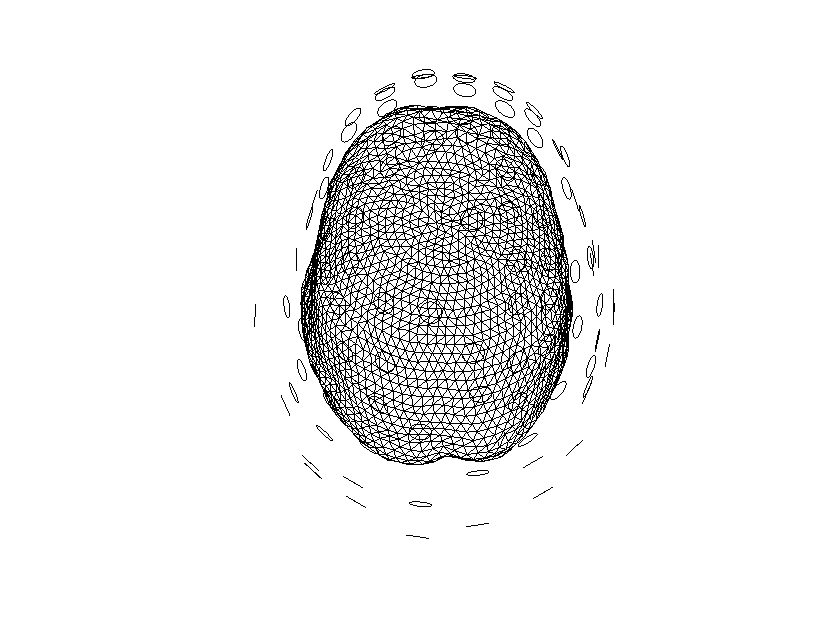
[12]:
%%

cfg                  = [];
cfg.grad             = freqPost.grad;
cfg.headmodel        = headmodel;

% use a 3-D grid with a 1 cm resolution
cfg.resolution       = 0.6;
cfg.sourcemodel.unit = 'cm';
sourcemodel = ft_prepare_leadfield(cfg);

%ft_prepare_sourcemodel has the possibility to do an inward shift to match
%better the boundaries: cfg.inwardshift if needed
using gradiometers specified in the configuration
converting units from 'mm' to 'cm'
converting units from 'mm' to 'cm'
computing surface normals
creating sourcemodel based on automatic 3D grid with the specified resolution
using gradiometers specified in the configuration
creating 3D grid with 0.6 cm resolution
initial 3D grid dimensions are [29 36 28]
5285 dipoles inside, 23947 dipoles outside brain
making tight grid
5285 dipoles inside, 5115 dipoles outside brain
the call to "ft_prepare_sourcemodel" took 2 seconds
computing leadfield
computing leadfield 6/52computing leadfield 35/528computing leadfield 64/528computing leadfield 98/528computing leadfield 125/52computing leadfield 155/52computing leadfield 186/52computing leadfield 222/52computing leadfield 261/52computing leadfield 299/52computing leadfield 325/52computing leadfield 363/52computing leadfield 401/52computing leadfield 439/52computing leadfield 478/52computing leadfield 507/52computing leadfield 537/52computing leadfield 574/52computing leadfield 611/52computing leadfield 643/52computing leadfield 673/52computing leadfield 708/52computing leadfield 744/52computing leadfield 782/52computing leadfield 818/52computing leadfield 857/52computing leadfield 894/52computing leadfield 930/52computing leadfield 968/52computing leadfield 998/52computing leadfield 1024/528computing leadfield 1053/528computing leadfield 1088/528computing leadfield 1118/528computing leadfield 1153/528computing leadfield 1186/528computing leadfield 1214/528computing leadfield 1242/528computing leadfield 1275/528computing leadfield 1302/528computing leadfield 1335/528computing leadfield 1362/528computing leadfield 1393/528computing leadfield 1427/528computing leadfield 1463/528computing leadfield 1498/528computing leadfield 1533/528computing leadfield 1570/528computing leadfield 1604/528computing leadfield 1631/528computing leadfield 1666/528computing leadfield 1701/528computing leadfield 1735/528computing leadfield 1769/528computing leadfield 1796/528computing leadfield 1819/528computing leadfield 1842/528computing leadfield 1868/528computing leadfield 1893/528computing leadfield 1913/528computing leadfield 1936/528computing leadfield 1958/528computing leadfield 1984/528computing leadfield 2007/528computing leadfield 2042/528computing leadfield 2075/528computing leadfield 2109/528computing leadfield 2143/528computing leadfield 2176/528computing leadfield 2204/528computing leadfield 2239/528computing leadfield 2271/528computing leadfield 2307/528computing leadfield 2346/528computing leadfield 2385/528computing leadfield 2423/528computing leadfield 2461/528computing leadfield 2500/528computing leadfield 2538/528computing leadfield 2568/528computing leadfield 2602/528computing leadfield 2635/528computing leadfield 2669/528computing leadfield 2706/528computing leadfield 2742/528computing leadfield 2778/528computing leadfield 2812/528computing leadfield 2844/528computing leadfield 2871/528computing leadfield 2903/528computing leadfield 2938/528computing leadfield 2974/528computing leadfield 3008/528computing leadfield 3041/528computing leadfield 3076/528computing leadfield 3110/528computing leadfield 3146/528computing leadfield 3180/528computing leadfield 3209/528computing leadfield 3244/528computing leadfield 3279/528computing leadfield 3311/528computing leadfield 3342/528computing leadfield 3373/528computing leadfield 3410/528computing leadfield 3444/528computing leadfield 3478/528computing leadfield 3514/528computing leadfield 3538/528computing leadfield 3565/528computing leadfield 3600/528computing leadfield 3631/528computing leadfield 3667/528computing leadfield 3693/528computing leadfield 3726/528computing leadfield 3761/528computing leadfield 3795/528computing leadfield 3830/528computing leadfield 3854/528computing leadfield 3890/528computing leadfield 3927/528computing leadfield 3961/528computing leadfield 3996/528computing leadfield 4024/528computing leadfield 4064/528computing leadfield 4103/528computing leadfield 4143/528computing leadfield 4182/528computing leadfield 4218/528computing leadfield 4257/528computing leadfield 4296/528computing leadfield 4335/528computing leadfield 4375/528computing leadfield 4410/528computing leadfield 4448/528computing leadfield 4486/528computing leadfield 4526/528computing leadfield 4565/528computing leadfield 4601/528computing leadfield 4641/528computing leadfield 4682/528computing leadfield 4721/528computing leadfield 4760/528computing leadfield 4798/528computing leadfield 4830/528computing leadfield 4869/528computing leadfield 4910/528computing leadfield 4947/528computing leadfield 4973/528computing leadfield 5008/528computing leadfield 5048/528computing leadfield 5087/528computing leadfield 5127/528computing leadfield 5159/528computing leadfield 5197/528computing leadfield 5238/528computing leadfield 5276/528computing leadfield 5285/5285
the call to "ft_prepare_leadfield" took 18 seconds
[13]:
%% Source analysis Without contrasting condition

cfg              = [];
cfg.method       = 'dics';
cfg.frequency    = 18;

cfg.channel          = {'L*','R*'};
cfg.sourcemodel  = sourcemodel;
cfg.headmodel    = headmodel;
cfg.dics.projectnoise = 'yes';
cfg.dics.lambda       = 0;

sourcePost_nocon = ft_sourceanalysis(cfg, freqPost);
the input is freq data with 109 channels, 1 frequencybins and no timebins
Warning: the selected value 18 should be within the range of the array from 17.1331 to 17.1331
 In 'C:\Users\hz3752\Documents\fieldtrip\utilities\nearest.m' at line 94
 In 'C:\Users\hz3752\Documents\fieldtrip\utilities\ft_selectdata.m' at line 1132
 In 'C:\Users\hz3752\Documents\fieldtrip\utilities\ft_selectdata.m' at line 287
 In 'C:\Users\hz3752\Documents\fieldtrip\ft_sourceanalysis.m' at line 335

the call to "ft_selectdata" took 0 seconds
converting the linearly indexed channelcombinations into a square CSD-matrix
using precomputed leadfields
the call to "ft_selectdata" took 0 seconds
using precomputed leadfields
scanning grid
scanning grid 523/52scanning grid 1871/528scanning grid 3598/528scanning grid 5285/5285
the call to "ft_sourceanalysis" took 2 seconds
[14]:
%% Interpolate power from grid points to the mri voxels


load mri_aligned mri_aligned

cfg            = [];
cfg.downsample = 2;
cfg.parameter  = 'pow';
sourcePostInt_nocon  = ft_sourceinterpolate(cfg, sourcePost_nocon, mri_aligned);


%%Plot  the source

cfg              = [];
cfg.method       = 'slice';
cfg.funparameter = 'pow';
ft_sourceplot(cfg, sourcePostInt_nocon);
the input is volume data with dimensions [208 300 320]
voxel size along 1st dimension (i) : 0.800000 mm
voxel size along 2nd dimension (j) : 0.800000 mm
voxel size along 3rd dimension (k) : 0.800000 mm
volume per voxel                   : 0.512000 mm^3
the input is source data with 10400 brainordinates on a [20 26 20] grid
could not reshape "freq" to the dimensions of the volume
updating homogenous coordinate transformation matrix
downsampling anatomy
downsampling inside
the call to "ft_volumedownsample" took 0 seconds
selecting subvolume of 19.1%
interpolating
interpolating 100.0
reslicing and interpolating pow
interpolating
interpolating 100.0
the call to "ft_sourceinterpolate" took 1 seconds
the input is source data with 2496000 brainordinates on a [104 150 160] grid
the call to "ft_selectdata" took 0 seconds
scaling anatomy to [0 1]
not using an atlas
not using a region-of-interest
[14]:
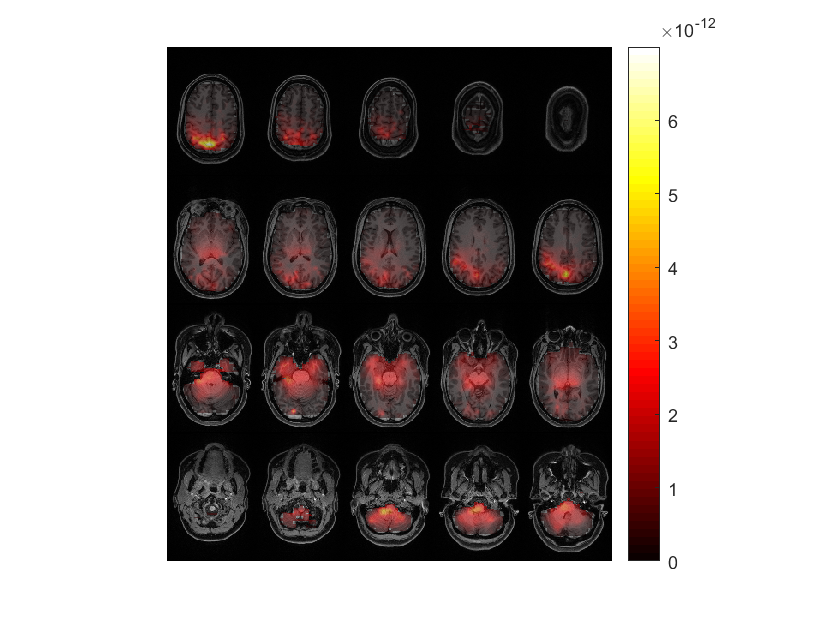
Warning: adding C:\Users\hz3752\Documents\fieldtrip\external\brewermap toolbox to your MATLAB pathWarning: adding C:\Users\hz3752\Documents\fieldtrip\external\matplotlib toolbox to your MATLAB pathWarning: adding C:\Users\hz3752\Documents\fieldtrip\external\cmocean toolbox to your MATLAB pathWarning: adding C:\Users\hz3752\Documents\fieldtrip\external\colorcet toolbox to your MATLAB path
scaling anatomy
the call to "ft_sourceplot" took 2 seconds
[15]:
%% Correcting the Bias in center noise by computing the noise index


sourceNAI = sourcePost_nocon;
sourceNAI.avg.pow = sourcePost_nocon.avg.pow ./ sourcePost_nocon.avg.noise;

cfg = [];
cfg.downsample = 2;
cfg.parameter = 'pow';
sourceNAIInt = ft_sourceinterpolate(cfg, sourceNAI , mri_aligned);
the input is volume data with dimensions [208 300 320]
voxel size along 1st dimension (i) : 0.800000 mm
voxel size along 2nd dimension (j) : 0.800000 mm
voxel size along 3rd dimension (k) : 0.800000 mm
volume per voxel                   : 0.512000 mm^3
the input is source data with 10400 brainordinates on a [20 26 20] grid
could not reshape "freq" to the dimensions of the volume
updating homogenous coordinate transformation matrix
downsampling anatomy
downsampling inside
the call to "ft_volumedownsample" took 0 seconds
selecting subvolume of 19.1%
interpolating
interpolating 100.0
reslicing and interpolating pow
interpolating
interpolating 100.0
the call to "ft_sourceinterpolate" took 1 seconds
[16]:
%% Plotting source activity after noise correction

%% For LF stimulus without contrasting AFter Noise Correction

maxval = max(sourceNAIInt.pow, [], 'all');

cfg = [];
cfg.method        = 'slice';
cfg.funparameter  = 'pow';
%cfg.maskparameter = cfg.funparameter;
% cfg.funcolorlim   = [4.0 maxval]; %
% cfg.opacitylim    = [4.0 maxval]; %Only make the color seeable in that interval
% cfg.opacitymap    = 'rampup';
ft_sourceplot(cfg, sourceNAIInt);
the input is source data with 2496000 brainordinates on a [104 150 160] grid
the call to "ft_selectdata" took 0 seconds
scaling anatomy to [0 1]
not using an atlas
not using a region-of-interest
[16]:
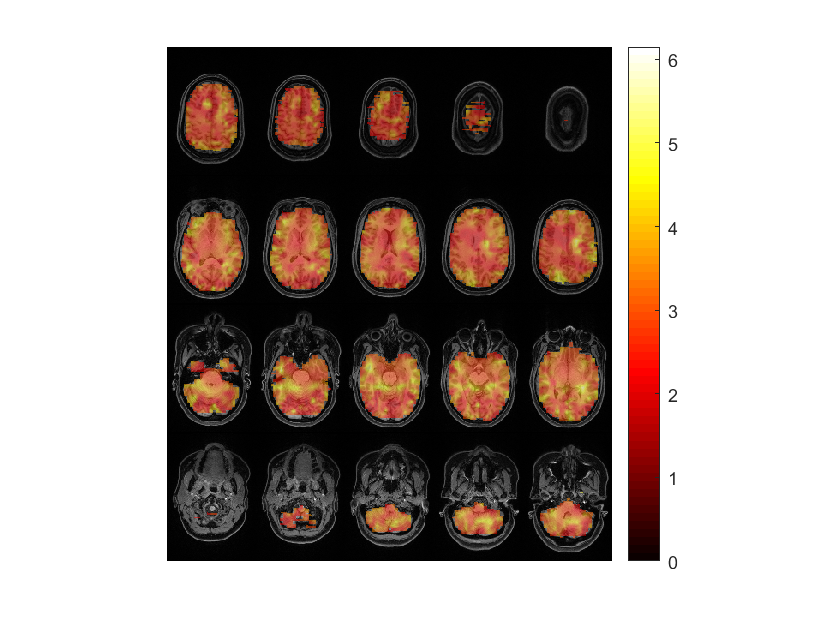
scaling anatomy
the call to "ft_sourceplot" took 1 seconds
[17]:
%% With contrasting

dataAll = ft_appenddata([], dataPre, dataPost);

cfg = [];
cfg.method    = 'mtmfft';
cfg.output    = 'powandcsd';
cfg.channel          = {'L*','R*'};
cfg.tapsmofrq = 4;
cfg.foilim    = [18 18];
freqAll = ft_freqanalysis(cfg, dataAll);


cfg              = [];
cfg.method       = 'dics';
cfg.frequency    = 18;
cfg.channel          = {'L*','R*'};
cfg.sourcemodel  = sourcemodel;
cfg.headmodel    = headmodel;
cfg.dics.projectnoise = 'yes';
cfg.dics.lambda       = '5%';
cfg.dics.keepfilter   = 'yes';
cfg.dics.realfilter   = 'yes';
sourceAll = ft_sourceanalysis(cfg, freqAll);


cfg.sourcemodel.filter = sourceAll.avg.filter;
sourcePre_con  = ft_sourceanalysis(cfg, freqPre );
sourcePost_con = ft_sourceanalysis(cfg, freqPost);

save sourcePre_con sourcePre_con
save sourcePost_con sourcePost_con
Warning: inconsistent sampleinfo
 In 'C:\Users\hz3752\Documents\fieldtrip\utilities\private\makessense.m' at line 115
 In 'C:\Users\hz3752\Documents\fieldtrip\utilities\ft_datatype_raw.m' at line 90
 In 'C:\Users\hz3752\Documents\fieldtrip\utilities\ft_checkdata.m' at line 279
 In 'C:\Users\hz3752\Documents\fieldtrip\ft_appenddata.m' at line 109
Warning: inconsistent sampleinfo
 In 'C:\Users\hz3752\Documents\fieldtrip\utilities\private\makessense.m' at line 115
 In 'C:\Users\hz3752\Documents\fieldtrip\utilities\ft_datatype_raw.m' at line 90
 In 'C:\Users\hz3752\Documents\fieldtrip\utilities\ft_checkdata.m' at line 279
 In 'C:\Users\hz3752\Documents\fieldtrip\ft_appenddata.m' at line 109

concatenating over the "rpt" dimension
the call to "ft_selectdata" took 0 seconds
the call to "ft_appenddata" took 0 seconds
the input is raw data with 109 channels and 120 trials
Warning: sampleinfo in the configuration is inconsistent with the actual data
 In 'C:\Users\hz3752\Documents\fieldtrip\utilities\private\fixsampleinfo.m' at line 94
 In 'C:\Users\hz3752\Documents\fieldtrip\utilities\ft_datatype_raw.m' at line 148
 In 'C:\Users\hz3752\Documents\fieldtrip\utilities\ft_checkdata.m' at line 279
 In 'C:\Users\hz3752\Documents\fieldtrip\ft_freqanalysis.m' at line 243
Warning: reconstructing sampleinfo by assuming that the trials are consecutive segments of a continuous recording
 In 'C:\Users\hz3752\Documents\fieldtrip\utilities\private\fixsampleinfo.m' at line 105
 In 'C:\Users\hz3752\Documents\fieldtrip\utilities\ft_datatype_raw.m' at line 148
 In 'C:\Users\hz3752\Documents\fieldtrip\utilities\ft_checkdata.m' at line 279
 In 'C:\Users\hz3752\Documents\fieldtrip\ft_freqanalysis.m' at line 243

the call to "ft_selectdata" took 0 seconds
Default cfg.pad='maxperlen' can run slowly. Consider using cfg.pad='nextpow2' for more efficient FFT computation.
processing trials
processing trial 8/120 nfft: 1751 samples, datalength: 1751 samples, 2 taperprocessing trial 19/120 nfft: 1751 samples, datalength: 1751 samples, 2 tapeprocessing trial 30/120 nfft: 1751 samples, datalength: 1751 samples, 2 tapeprocessing trial 42/120 nfft: 1751 samples, datalength: 1751 samples, 2 tapeprocessing trial 55/120 nfft: 1751 samples, datalength: 1751 samples, 2 tapeprocessing trial 68/120 nfft: 1751 samples, datalength: 1751 samples, 2 tapeprocessing trial 80/120 nfft: 1751 samples, datalength: 1751 samples, 2 tapeprocessing trial 92/120 nfft: 1751 samples, datalength: 1751 samples, 2 tapeprocessing trial 103/120 nfft: 1751 samples, datalength: 1751 samples, 2 taperprocessing trial 117/120 nfft: 1751 samples, datalength: 1751 samples, 2 taperprocessing trial 120/120 nfft: 1751 samples, datalength: 1751 samples, 2 tapers
the call to "ft_freqanalysis" took 1 seconds
the input is freq data with 96 channels, 1 frequencybins and no timebins
Warning: the selected value 18 should be within the range of the array from 17.1331 to 17.1331
 In 'C:\Users\hz3752\Documents\fieldtrip\utilities\nearest.m' at line 94
 In 'C:\Users\hz3752\Documents\fieldtrip\utilities\ft_selectdata.m' at line 1132
 In 'C:\Users\hz3752\Documents\fieldtrip\utilities\ft_selectdata.m' at line 287
 In 'C:\Users\hz3752\Documents\fieldtrip\ft_sourceanalysis.m' at line 335

the call to "ft_selectdata" took 0 seconds
converting the linearly indexed channelcombinations into a square CSD-matrix
using precomputed leadfields
the call to "ft_selectdata" took 0 seconds
using precomputed leadfields
scanning grid
scanning grid 1144/528scanning grid 2388/528scanning grid 4341/528scanning grid 5285/5285
the call to "ft_sourceanalysis" took 1 seconds
the input is freq data with 109 channels, 1 frequencybins and no timebins
Warning: the selected value 18 should be within the range of the array from 17.1331 to 17.1331
 In 'C:\Users\hz3752\Documents\fieldtrip\utilities\nearest.m' at line 94
 In 'C:\Users\hz3752\Documents\fieldtrip\utilities\ft_selectdata.m' at line 1132
 In 'C:\Users\hz3752\Documents\fieldtrip\utilities\ft_selectdata.m' at line 287
 In 'C:\Users\hz3752\Documents\fieldtrip\ft_sourceanalysis.m' at line 335

the call to "ft_selectdata" took 0 seconds
converting the linearly indexed channelcombinations into a square CSD-matrix
using precomputed filters, not computing any leadfields
the call to "ft_selectdata" took 0 seconds
using precomputed filters
scanning grid
scanning grid 1303/528scanning grid 3699/528scanning grid 5285/5285
the call to "ft_sourceanalysis" took 1 seconds
the input is freq data with 109 channels, 1 frequencybins and no timebins
Warning: the selected value 18 should be within the range of the array from 17.1331 to 17.1331
 In 'C:\Users\hz3752\Documents\fieldtrip\utilities\nearest.m' at line 94
 In 'C:\Users\hz3752\Documents\fieldtrip\utilities\ft_selectdata.m' at line 1132
 In 'C:\Users\hz3752\Documents\fieldtrip\utilities\ft_selectdata.m' at line 287
 In 'C:\Users\hz3752\Documents\fieldtrip\ft_sourceanalysis.m' at line 335

the call to "ft_selectdata" took 0 seconds
converting the linearly indexed channelcombinations into a square CSD-matrix
using precomputed filters, not computing any leadfields
the call to "ft_selectdata" took 0 seconds
using precomputed filters
scanning grid
scanning grid 1435/528scanning grid 3533/528scanning grid 5285/5285
the call to "ft_sourceanalysis" took 1 seconds
[18]:
%%
sourceDiff = sourcePost_con;
sourceDiff.avg.pow = (sourcePost_con.avg.pow - sourcePre_con.avg.pow) ./ sourcePre_con.avg.pow;


cfg            = [];
%cfg.downsample = 2;
cfg.parameter  = 'pow';
cfg.channel          = {'L*','R*'};
sourceDiffInt  = ft_sourceinterpolate(cfg, sourceDiff , mri_aligned);
the input is volume data with dimensions [208 300 320]
voxel size along 1st dimension (i) : 0.800000 mm
voxel size along 2nd dimension (j) : 0.800000 mm
voxel size along 3rd dimension (k) : 0.800000 mm
volume per voxel                   : 0.512000 mm^3
the input is source data with 10400 brainordinates on a [20 26 20] grid
Warning: could not determine dimord of "label" in:

            freq: 17.1331
             cfg: [1x1 struct]
             dim: [20 26 20]
          inside: [10400x1 logical]
             pos: [10400x3 double]
            unit: 'cm'
             pow: [10400x1 double]
           noise: [10400x1 double]
          filter: {10400x1 cell}
           label: {96x1 cell}
    filterdimord: '{pos}_ori_chan'
       transform: [4x4 double]
 In 'C:\Users\hz3752\Documents\fieldtrip\utilities\private\getdimord.m' at line 789
 In 'C:\Users\hz3752\Documents\fieldtrip\utilities\private\getdimord.m' at line 739
 In 'C:\Users\hz3752\Documents\fieldtrip\utilities\ft_checkdata.m' at line 1434
 In 'C:\Users\hz3752\Documents\fieldtrip\utilities\ft_checkdata.m' at line 401
 In 'C:\Users\hz3752\Documents\fieldtrip\ft_sourceinterpolate.m' at line 170
Warning: could not determine dimord of "label" in:

            freq: 17.1331
             cfg: [1x1 struct]
             dim: [20 26 20]
          inside: [10400x1 logical]
             pos: [10400x3 double]
            unit: 'cm'
             pow: [10400x1 double]
           noise: [10400x1 double]
          filter: {10400x1 cell}
           label: {96x1 cell}
    filterdimord: '{pos}_ori_chan'
       transform: [4x4 double]
 In 'C:\Users\hz3752\Documents\fieldtrip\utilities\private\getdimord.m' at line 789
 In 'C:\Users\hz3752\Documents\fieldtrip\utilities\private\getdimord.m' at line 739
 In 'C:\Users\hz3752\Documents\fieldtrip\utilities\ft_checkdata.m' at line 1434
 In 'C:\Users\hz3752\Documents\fieldtrip\utilities\ft_checkdata.m' at line 401
 In 'C:\Users\hz3752\Documents\fieldtrip\ft_sourceinterpolate.m' at line 170

could not reshape "freq" to the dimensions of the volume
selecting subvolume of 19.1%
interpolating
interpolating 70.interpolating 100.0
reslicing and interpolating pow
interpolating
interpolating 55.interpolating 100.0
the call to "ft_sourceinterpolate" took 3 seconds
[19]:
%% Plot the source frequencies with contrasting (pre and post)

maxval = max(sourceDiffInt.pow, [], 'all');

cfg = [];
cfg.method        = 'slice';
cfg.funparameter  = 'pow';
cfg.channel          = {'L*','R*'};
cfg.maskparameter = cfg.funparameter;
cfg.funcolorlim   = [0.0 maxval];
cfg.opacitylim    = [0.0 maxval];
cfg.opacitymap    = 'rampup';
ft_sourceplot(cfg, sourceDiffInt);
the input is source data with 19968000 brainordinates on a [208 300 320] grid
the call to "ft_selectdata" took 0 seconds
scaling anatomy to [0 1]
not using an atlas
not using a region-of-interest
[19]:
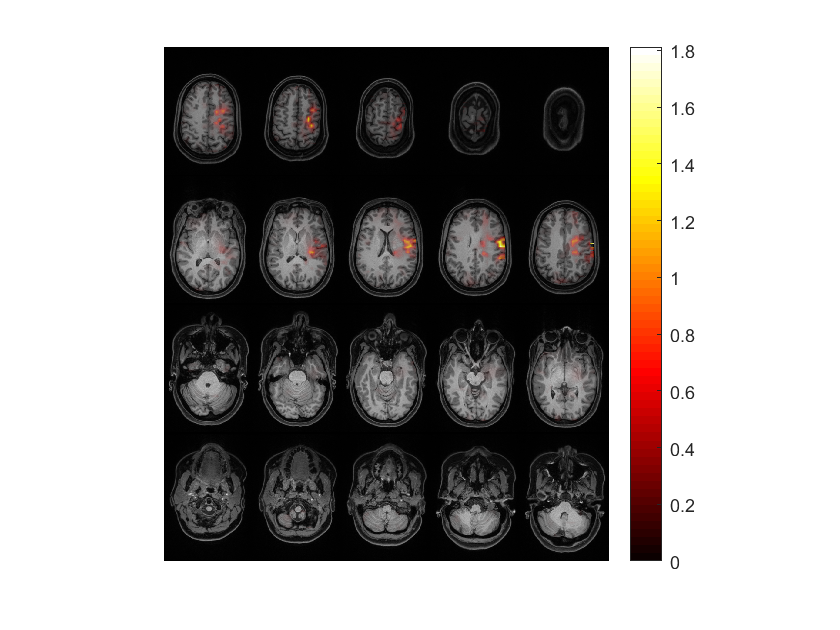
scaling anatomy
the call to "ft_sourceplot" took 3 seconds
Dipole fitting
We will fit dipole at the N100 ERF component. It happens 100 ms after stimulus. It relates to hearing a sound. Appears in both deviant and standard tones. It is localized in both left and right primary auditory areas.
[19]:
load avgLF avgLF
load avgHF avgHF
load avgWN avgWN

load mri_aligned mri_aligned
load sensors sensors
load headmodel headmodel
[5]:
cfg = [];
cfg.layout = 'fieldlinebeta2bz_helmet.mat';
cfg.showlabels = 'yes';
ft_multiplotER(cfg, avgLF);
the call to "ft_selectdata" took 0 seconds
reading layout from file fieldlinebeta2bz_helmet.mat
reading 'layout' from file 'fieldlinebeta2bz_helmet.mat'
the call to "ft_prepare_layout" took 0 seconds
[5]:

the call to "ft_multiplotER" took 1 seconds
In the figure above we see the time series for each OPM sensor. Let’s select and click the sensors close to the right auditory cortex (located next to the right ear): 
Despite the high-frequency signal, we can observe a low-frequency negative peak at around 100 ms. Let’s select and click on it to view the topography: 

Between 97 and 156 ms, we clearly see two dipolar patterns: one on the right auditory cortex and one on the left auditory cortex. This is the topography of the N100 ERF component. Before performing source reconstruction, let’s think where we would fit the two dipoles on this topography. The position of the dipoles is between each dipolar pattern and the orientation is determined using the right-hand rule: 
Repeat the analysis for the high frequency tone (i.e., using avgHF). Can you find a similar dipolar pattern?
Let’s move on to the source reconstruction using the dipole fitting method. For a similar FieldTrip tutorial see: https://www.fieldtriptoolbox.org/workshop/natmeg2014/dipolefitting/
[ ]:
%% Dipole fitting on all the 96 OPM sensors

cfg            = [];
cfg.latency    = [0.97 1.56];
cfg.numdipoles = 2;
cfg.symmetry   = 'x';
cfg.unit       = 'mm';
cfg.gridsearch = 'yes';
cfg.grad       = sensors;
cfg.channel    = {'all'};
cfg.headmodel  = headmodel;
dip100         = ft_dipolefitting(cfg, avgLF);

figure;
hold on

ft_plot_dipole(dip100.dip.pos(1,:), mean(dip100.dip.mom(1:3,:),2), 'color', 'b', 'thickness', 1, 'length', 10,'diameter', 3)
ft_plot_dipole(dip100.dip.pos(2,:), mean(dip100.dip.mom(4:6,:),2), 'color', 'b','thickness', 1, 'length', 10,'diameter', 3)

pos = mean(dip100.dip.pos,1);
ft_plot_slice(mri_aligned.anatomy, 'transform', mri_aligned.transform, 'location', pos, 'orientation', [1 0 0], 'resolution', 0.1)
ft_plot_slice(mri_aligned.anatomy, 'transform', mri_aligned.transform, 'location', pos, 'orientation', [0 1 0], 'resolution', 0.1)
ft_plot_slice(mri_aligned.anatomy, 'transform', mri_aligned.transform, 'location', pos, 'orientation', [0 0 1], 'resolution', 0.1)

ft_plot_crosshair(pos, 'color', [1 1 1]/2);

axis tight
axis off

view(0, 90)

The dipoles are not fitted where we expected. We expected the dipoles to be at the right and left auditory cortices (which are in the right and left temporal lobe respectively), but our dipoles appear in the occipital lobe.
This issue might be due to poor co-registration between the sensors and the headshape, for example we see that two sensors in the top left corner are far from the scalp:

Let’s ignore these two sensors and repeat the dipole fitting
[ ]:
cfg            = [];
cfg.latency    = [0.97 1.56];
cfg.numdipoles = 2;
cfg.symmetry   = 'x';
cfg.unit       = 'mm';
cfg.gridsearch = 'yes';
cfg.grad       = sensors;
cfg.channel    = {'all', '-L113_bz', '-L111_bz'}; % remove the two sensors that are far from the scalp
cfg.headmodel  = headmodel;
dip100         = ft_dipolefitting(cfg, avgLF);

figure;
hold on

ft_plot_dipole(dip100.dip.pos(1,:), mean(dip100.dip.mom(1:3,:),2), 'color', 'r', 'thickness', 1, 'length', 10,'diameter', 3)
ft_plot_dipole(dip100.dip.pos(2,:), mean(dip100.dip.mom(4:6,:),2), 'color', 'r','thickness', 1, 'length', 10,'diameter', 3)


pos = mean(dip100.dip.pos,1);
ft_plot_slice(mri_aligned.anatomy, 'transform', mri_aligned.transform, 'location', pos, 'orientation', [1 0 0], 'resolution', 0.1)
ft_plot_slice(mri_aligned.anatomy, 'transform', mri_aligned.transform, 'location', pos, 'orientation', [0 1 0], 'resolution', 0.1)
ft_plot_slice(mri_aligned.anatomy, 'transform', mri_aligned.transform, 'location', pos, 'orientation', [0 0 1], 'resolution', 0.1)

ft_plot_crosshair(pos, 'color', [1 1 1]/2);

axis tight
axis off

view(0, 90)

This dipole fit is better but still it seems that the dipoles are not in the right and left auditory areas which should be more frontal and medial. It is interesting to see how these dipole fits will change, if we use HPI coils to coregister sensors and headshape.
Let’s release the symmetry constraint (cfg.symmetry = []) & use the previously fitted positions as the starting point for the dipole fit (cfg.dip.pos = dip100.dip.pos;)
[ ]:
cfg            = [];
cfg.latency    = [0.97 1.56];
cfg.numdipoles = 2;
cfg.symmetry   = [];
cfg.dip.pos    = dip100.dip.pos;
cfg.unit       = 'mm';
cfg.gridsearch = 'no';
cfg.grad       = sensors;
cfg.headmodel  = headmodel;
dip100_nosym         = ft_dipolefitting(cfg, avgLF);

figure;
hold on

ft_plot_dipole(dip100.dip.pos(1,:), mean(dip100.dip.mom(1:3,:),2), 'color', 'r','thickness', 3, 'length', 10,'diameter', 3)
ft_plot_dipole(dip100.dip.pos(2,:), mean(dip100.dip.mom(4:6,:),2), 'color', 'r','thickness', 3, 'length', 10,'diameter', 3)

ft_plot_dipole(dip100_nosym.dip.pos(1,:), mean(dip100_nosym.dip.mom(1:3,:),2), 'color', 'g','thickness', 1, 'length', 10,'diameter', 3)
ft_plot_dipole(dip100_nosym.dip.pos(2,:), mean(dip100_nosym.dip.mom(4:6,:),2), 'color', 'g','thickness', 1, 'length', 10,'diameter', 3)

pos = mean(dip100.dip.pos,1);
ft_plot_slice(mri_aligned.anatomy, 'transform', mri_aligned.transform, 'location', pos, 'orientation', [1 0 0], 'resolution', 0.1)
ft_plot_slice(mri_aligned.anatomy, 'transform', mri_aligned.transform, 'location', pos, 'orientation', [0 1 0], 'resolution', 0.1)
ft_plot_slice(mri_aligned.anatomy, 'transform', mri_aligned.transform, 'location', pos, 'orientation', [0 0 1], 'resolution', 0.1)

ft_plot_crosshair(pos, 'color', [1 1 1]/2);

axis tight
axis off

view(0, 90)

Noise
Noise floors
We can calculate the noise floor with empty room recordings. We usually perform these before and after our experiment. Press here for an example from MNE python.
Common types of noise:
environmental noise (i.e., vibrations of the MSR, cars or other metal objects moving outside the MSR). The OPMs as magnetometers are very sensitive to the environmental noise.
head movements
eye blinks
sensor noise
Cleaning Methods:
Environmental Noise: Use Homogeneous Field Correction (HFC) to reduce this noise (Tierney et al., 2021).
Eye Blinks: Eye blinks are low-frequency, so they won’t pose a problem if we care about high frequency activity. They can be cleaned with methods like Independent Component Analysis (ICA) (FieldTrip Tutorial).
Head movement: At Donders we use experimental methods to prevent the subject from moving its head. Techniques like Maxfilter (or TSSS) can be used to clean this type of noise.
Understand your research paradigm and do not clean the data as much as you can. The EEG/MEG data is better left as it is (Delorme, 2023).
Ways to improve this notebook
adapt the filenames of datasets to BIDS
confirm that fieldlinebeta2 is the proper sensor layout for the OPM at NYUAD
add time-lock analysis to complement the frequency analysis
instead of using
cfg.layout = 'fieldlinebeta2bz_helmet.mat';we can maybe use the layout given by the .fif? ANSWER: Nowhen contrasting, we need to have the same number of trials in each type to not bias the noise, this haven’t been implemented in this pipeline yet
The FastScan laser headscan and fiducials needs to be converted to the .pos standard matrix file type in fieldtrip
Question, in Donders does the OPM sensors can be displaced to account for head position or not?
[ ]: