Processes
MEG Project Proposal
All new project proposals must fill the following form. Add as many known details as possible regarding:
the topic of your project
the research question you are addressing
additional systems that you will need to run your experiment successfully
Identifying your usage
(Add usage form)
Booking a session for testing/debugging your stimulus code
If you do NOT need MEG Scientist assistance:
You can book the lab anytime (24/7)
Go to the MEG Booking Portal
Select MEG System - KIT
If you DO need MEG Scientist assistance:
Sessions are restricted to 9:00 AM – 5:00 PM
Check the MEG Scientist’s availability on his calendar or email him
Once availability is confirmed, book your lab slot via the MEG Booking Portal
Select MEG System - KIT
Alternatively, you can book via Corelabs Reservations.
Booking an MEG data acquisition session
Warning
While scheduling your experiment, avoid rush hours 8:30am and 5:30pm, and friday prayer time, as more noise can be introduced into the data due to outside movement. All bookings should not happen on a monday morning, as Helium refill is scheduled for monday mornings (8:00 am till 10:30 am) and it is not possible to acquire data during this period. Provide your netID to the MEG scientists nyuad.meg@nyu.edu for you to have access to the lab booking calendar.
Subscribing to the Google MEG Lab Calendar mirroring CTPSS Calendar
To see the lab’s availability directly in your Google Calendar:
Open Google Calendar.
On the left side, next to Other calendars, click the + (plus) icon and select Subscribe to calendar.
In the Add calendar box, click below:
Click here to add [MEG LAB] Corelabs CTPSS Data Acquisition Bookings to your Google Calendar
The calendar will now appear in your list under “Other calendars”.
Note
This calendar is not for booking the lab but acts only as a mirror to the official CTPSS calendar. Do not use this calendar for booking your lab, but only to schedule your participants as detailed below.
Scheduling Participants with Appointment Schedules on Google Calendar
When recruiting participants, you can provide them with a link to book their own slots based on your availability and the lab’s availability.
- 1. Create an Appointment Schedule:
In Google Calendar, click the Create button and select Appointment schedule.
Set your preferred hours and duration for the MEG sessions.
- 2. Check Multiple Calendars for Availability:
In the appointment schedule configuration, look for the Calendars checked for availability section.
Ensure your primary calendar is selected so slots aren’t offered when you are busy.
Click Calendars and select the [MEG LAB] Corelabs CTPSS Data Acquisition Bookings (subscribed to in the previous step). This ensures participants can only book when the lab is also free.
- 3. Share the Booking Link:
Once the schedule is created, click Share to get a booking link.
Send this link to your participants. They will see the available slots that work for both you and the lab.
Important
After a participant books a slot via the link: You must still ensure the lab is officially reserved in the Corelabs system.
Scan the QR code below to book your lab for your usage, login with Gmail using your @nyu.edu account:
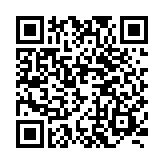
or simply go to https://corelabs.abudhabi.nyu.edu/
If you do not have access to the booking system, please email nyuad.meg@nyu.edu to be added to the system.
Under Reservations, Schedule, from the upper drop down menu pick Brain Imaging and then book the MagnetoEncephaloGraphy MEG-KIT.
If you need the MEG scientist (Hadi Zaatiti) to be present during the booking (e.g., for training): - Ensure the slot is available on his calendar hz3752@nyu.edu. - Send a meeting invite to hz3752 with subject MEG Training (or Debug or other) of [name and netID of trainee]. - Confirm the lab booking via Corelabs.